
Difference of Two Line Segments by Gabriella Yates
Loading the math board and drawing, please wait…
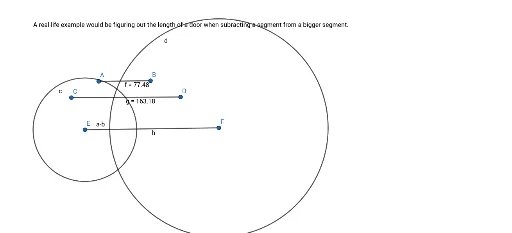
This example demonstrates the geometric representation and calculation of the difference in lengths between two line segments. Core math concepts include segment length, difference calculation, and coordinate geometry. Construction highlights involve using Segment commands for A, B, C, D, E, F, Circle for auxiliary circles, and text objects text1, text2 to display difference results. Suitable for high school mathematics teaching to understand segment operations and geometric intuition.
GeoGebra Commands & Parameters
Segment(A, B) → fSegment(C, D) → gSegment(E, F) → hCircle(E, Segment[A, B]) → cCircle(F, Segment[C, D]) → d
AI Drawing Prompt Reference
Draw three line segments, with two serving as reference segments and the third as the segment to compare. Using one endpoint of the third segment as the center, draw a circle with radius equal to the length of the first reference segment. Using the other endpoint of the third segment as the center, draw another circle with radius equal to the length of the second reference segment. These circles intersect the third segment and its extension, visually showing the difference in length between the two reference segments. Label the difference value and include text annotations to illustrate the concept of segment length difference for geometry teaching.
The prompt above was compiled from the original drawing commands and is for reference only.