
Determining the Center of Dilation: Exploring Polygon Similarity
Loading the math board and drawing, please wait…
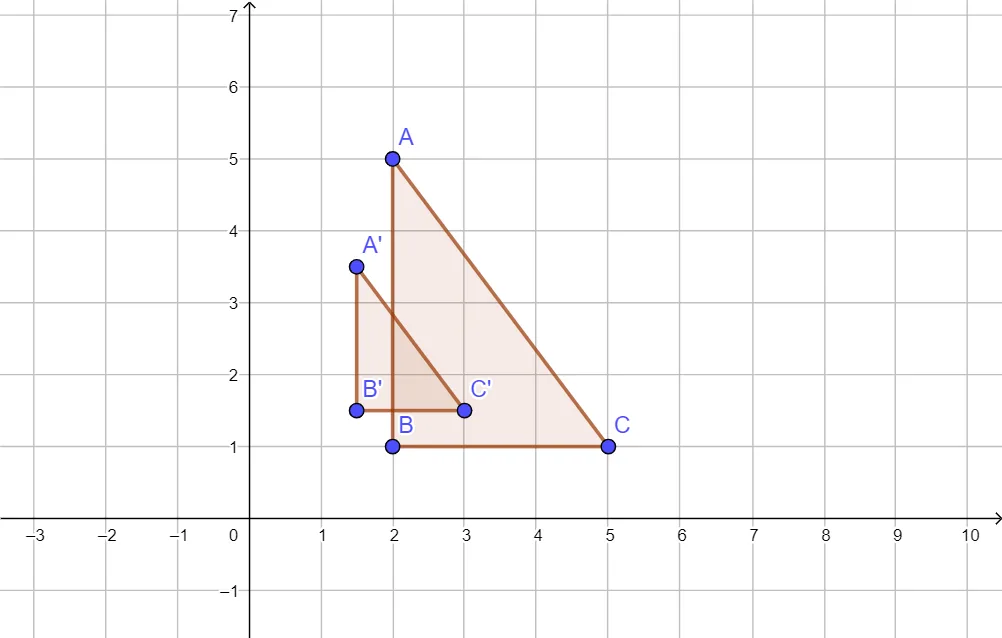
This GeoGebra example demonstrates how to locate the center of a dilation by examining a polygon and its dilated image. The core mathematical concept is dilation, a geometric transformation that changes size while preserving shape; the center is found as the intersection of lines connecting corresponding vertices (e.g., A to A'). Construction details: the Polygon command creates triangle ABC, and the Dilate command generates the dilated triangle A'B'C' with a specified center. The corresponding sides (a, b, c and a', b', c') and vertex connectors are shown to visualize the center. This is suitable for middle or high school students learning geometric transformations, and for teachers illustrating the properties of similarity and the uniqueness of the dilation center. It reinforces spatial reasoning and the connection between visual observation and formal geometric proof.
GeoGebra Commands & Parameters
Polygon(A, B, C) → t1, c, a, bDilate(A, 0.5, D) → A'Dilate(B, 0.5, D) → B'Dilate(C, 0.5, D) → C'Polygon(A', B', C') → t1', c', a', b'
AI Drawing Prompt Reference
Draw a triangle ABC, then dilate it by 0.5 with respect to point D to get triangle A'B'C'. Connect the corresponding vertices of the original and dilated triangles to find the center of dilation point D.
The prompt above was compiled from the original drawing commands and is for reference only.