
Determining Missing Angles: Geometric Construction and Properties of Quadrilater
Loading the math board and drawing, please wait…
In collections
Deltoid - Eigenschaften und Konstruktionen
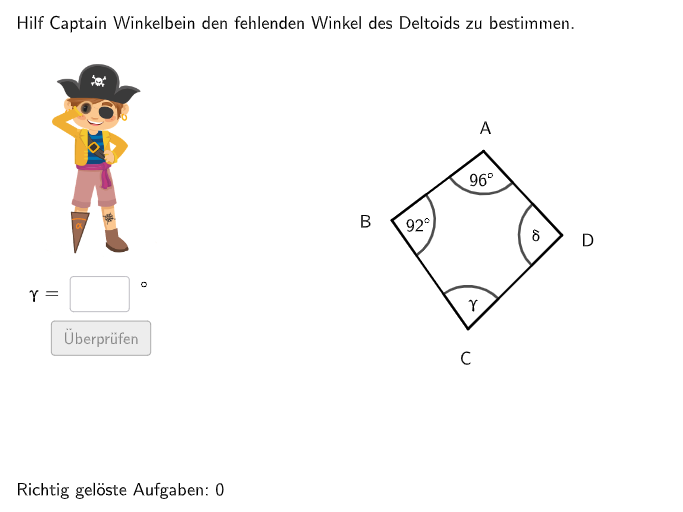
This example demonstrates how to determine missing angles through geometric construction, focusing on properties of special quadrilaterals such as parallelograms, rhombuses, and trapezoids. The construction involves GeoGebra commands like Random, Shuffle, Rotate, Line, Circle, Intersect, Angle, etc. It is suitable for students in grades 5-6 to learn geometric construction and apply quadrilateral properties.
GeoGebra Commands & Parameters
Random(1, 360) → randomgradShuffle(Sequence[i, i, 70, 100]) → alphaList, {96, 71, 79, 83, 88, 77, 91, 98, 70, 85, 87, 76, 94, 78, 97, 99, 81, 84, 82, 75, 90, 80, 72, 95, 74, 92, 100, 86, 89, 73, 93}Shuffle(Sequence[i, i, minbeta + 40, maxbeta - 30]) → betaList, {92, 91, 93, 96, 95, 99, 97, 94, 90, 98, 100}Rotate(MKreis + (0, b), randomgrad°, MKreis) → ALine(A, MKreis) → jRotate(SenkP, (-(α / 2)) + randomgrad°, A) → SenkP'_{1}Ray(A, SenkP'_{1}) → fCircle(A, a) → cIntersect(c, f) → B,Rotate(A, (-β), B) → B'Ray(B, B') → iShuffle({1, 2, 3, 4}) → gesuchtListe, {3, 2, 4, 1}Rotate(SenkP, α / 2 + randomgrad°, A) → SenkP'Ray(A, SenkP') → gIntersect(c, g) → D, C_{1}Angle(B, A, D) → alpRotate(A, β, D) → A'Ray(D, A') → hIntersect(i, j) → CAngle(D, C, B) → gamTextfield(input1) → InputBox1Textfield(input2) → InputBox2Polygon(PtopLeftCornerFeedback, PtopRightCornerFeedback, PbottomRightCornerFeedback, PbottomLeftCornerFeedback) → rectangleCorrect, rectangleCorrectS3, rectangleCorrectS4, rectangleCorrectS2, rectangleCorrectS1Shuffle(Sequence[Random[0, 10], i, 1, 100]) → randomNosForX, {2, 10, 9, 4, 8, 9, 5, 10, 9, 6, 5, 5, 5, 10, 9, 0, 5, 10, 2, 4, 3, 4, 5, 6, 7, 8, 10, 5, 4, 7, 7, 6, 4, 6, 1, 1, 10, 10, 0, 1, 6, 1, 4, 8, 1, 2, 3, 4, 4, 6, 2, 4, 10, 6, 5, 3, 7, 10, 5, 10, 0, 2, 8, 5, 9, 7, 7, 0, 9, 4, 3, 6, 6, 0, 9, 7, 1, 1, 8, 5, 0, 2, 3, 7, 1, 6, 9, 5, 1, 1, 8, 2, 3, 7, 5, 4, 5, 6, 10, 10}Element(randomNosForX, Mod[questionCount, 100] + 1) → numXShuffle(Sequence[Random[0, 10], i, 1, 100]) → randomNosForY, {1, 8, 0, 0, 5, 8, 6, 2, 5, 2, 7, 1, 6, 3, 8, 7, 6, 0, 1, 5, 10, 6, 6, 3, 3, 10, 3, 7, 6, 10, 1, 10, 4, 3, 7, 8, 4, 0, 10, 9, 9, 5, 7, 5, 5, 3, 0, 6, 9, 8, 3, 10, 6, 9, 4, 7, 9, 6, 1, 4, 8, 4, 5, 4, 6, 9, 7, 0, 4, 5, 3, 3, 7, 6, 2, 8, 8, 5, 2, 10, 8, 9, 5, 5, 4, 10, 3, 6, 3, 5, 3, 3, 2, 4, 0, 5, 9, 5, 3, 4}Element(randomNosForY, Mod[questionCount, 100] + 1) → numYAppend(true, Sequence[If[randomNosForX(i) ≟ randomNosForX(i - 1), false, true], i, 2, 100]) → stayXAppend(true, Sequence[If[randomNosForY(i) ≟ randomNosForY(i - 1), false, true], i, 2, 100]) → stayYRemove(Sequence[If[stayX(i), randomNosForX(i), 0], i, 1, 100], Sequence[0, i, 1, 100]) → randomNosForXwithoutRepeatRemove(Sequence[If[stayY(i), randomNosForY(i), 0], i, 1, 100], Sequence[0, i, 1, 100]) → randomNosForYwithoutRepeatElement(randomNosForXwithoutRepeat, Mod[questionCount, Length[randomNosForXwithoutRepeat]] + 1) → numXwithoutRepeatElement(randomNosForYwithoutRepeat, Mod[questionCount, Length[randomNosForYwithoutRepeat]] + 1) → numYwithoutRepeatDefined(input1) → fixedAngle(SenkP, A, SenkP') → SantasLittleHelper2Angle(SenkP'_{1}, A, SenkP) → SantasLittleHelper1Angle(A, D, C) → delAngle(C, B, A) → betIf(gesucht ≟ 1 ∨ gesucht ≟ 3, RandomElement[{2, 4}], gesucht ≟ 2, RandomElement[{1, 3, 4}], gesucht ≟ 4, RandomElement[{1, 2, 3}]) → gesucht2Midpoint(A, C) → ECircle(MKreis, 4) → dRotate(A + (0, 0.5), randomgrad°, A) → BeschPosARotate(C + (0, -0.5), randomgrad°, C) → BeschPosCRotate(B + (-0.5, 0), randomgrad°, B) → BeschPosBRotate(D + (0.5, 0), randomgrad°, D) → BeschPosDMidpoint(B, D) → MDeltText(BeschriftungAlpha, BeschPosAlpha, false, true, 0, 0) → Text10Text(BeschriftungBeta, BeschPosBeta, false, true, 0, 0) → Text11Text(BeschriftungGamma, BeschPosGamma, false, true, 0, 0) → Text12Text(BeschriftungDelta, BeschPosDelta, false, true, 0, 0) → Text13Text(BeschA, BeschPosA, false, true, 0, 0) → Text14Text(BeschB, BeschPosB, false, true, 0, 0) → Text15Text(BeschC, BeschPosC, false, true, 0, 0) → Text16Text(BeschD, BeschPosD, false, true, 0, 0) → Text17
AI Drawing Prompt Reference
On a coordinate plane, place a central point and draw a circle with radius a centered at it. Choose a point on the circle and construct a ray from the center through this point, then use a rotation to create a second ray direction so that corresponding points on the circle are produced. Determine the relevant intersection points of the rays with the circle to form two circle points and use them to form the key angles at the center and at another constructed point on the angle diagram. Label three angles in the figure (using the rays determined by the constructed intersection points) and include two text input fields so a user can fill in angle measures. Finally, draw a quadrilateral using four specified corner points (top-left, top-right, bottom-right, bottom-left) as the main polygon in the picture.
The prompt above was compiled from the original drawing commands and is for reference only.