
Determine Volume by Decomposition Using GeoGebra
Loading the math board and drawing, please wait…
In collections
Ⓔ Volumen zusammengesetzter Körper aus Quader und Würfel
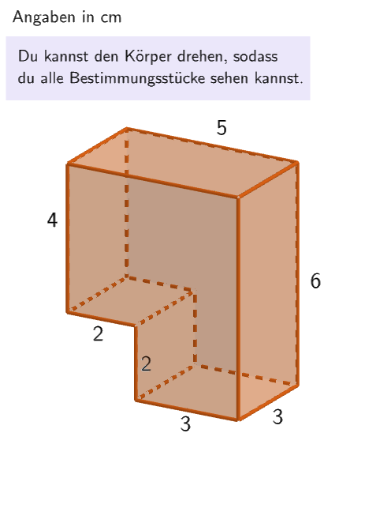
This example demonstrates how to calculate the volume of a composite solid by decomposing it using GeoGebra tools. Key mathematical concepts include solid geometry volume calculation, decomposition principles, and application of unit cubes. Construction involves using commands like Translate, If, Element, Shuffle, Sum, and CornerThreeD to build 3D models, with objects such as dz, dx, and object122 for spatial transformations. Suitable for elementary and middle school students to understand volume computation methods, applicable in classroom teaching or self-study.
GeoGebra Commands & Parameters
Translate({Prism[Polygon[(-0.5, 1.5, -1), (-0.5, 1.5, -1) + (3, 0), (-0.5, 1.5, -1) + (3, -3), (-0.5, 1.5, -1) + (0, -3)], (-0.5, 1.5, 5)]}, Vector[(dx / 2 + 0.001, 0, 0)]) → object122HintSenkrecht1Translate({Prism[Polygon[(-0.5, 1.5), (-0.5, 1.5) + (3, 0), (-0.5, 1.5) + (3, 0, 2), (-0.5, 1.5) + (0, 0, 2)], (-0.5, -1.5)]}, Vector[(0, 0, ((-dz)) / 2 - 1)]) → object122HintWaagrecht1Translate({Prism[Polygon[(-2.5, 1.5, 1), (-2.5, 1.5, 1) + (5, 0), (-2.5, 1.5, 1) + (5, 0, 4), (-2.5, 1.5, 1) + (0, 0, 4)], (-2.5, -1.5, 1)]}, Vector[(dx, 0, dz / 2 + 0.001)]) → object122HintWaagrecht2Translate({Prism[Polygon[(-0.5, 1.5, 1), (-0.5, 1.5, 1) + (0, -3), (-0.5, 1.5, 1) + (-2, -3), (-0.5, 1.5, 1) + (-2, 0)], (-0.5, 1.5, 5)]}, Vector[(((-dx)) / 2, 0, 0)]) → object122HintSenkrecht2If(SelectedIndex[l1] ≟ 2, Volume[object122HintWaagrecht1(1)], Volume[object122HintSenkrecht1(1)]) → sol2If(SelectedIndex[l1] ≟ 2, Volume[object122HintWaagrecht2(1)], Volume[object122HintSenkrecht2(1)]) → sol1Element(randomQuestions, Mod[questionCount, Length[randomQuestions]] + 1) → randomQuestionElement(allQuestions, randomQuestion) → actualQuestionShuffle(Sequence[Element[actualQuestion, i], i, 2, numberOfAnswers + 1]) → actualAnswersShuffled, {?, ?, ?, ?, ?, ?}Element(actualAnswersShuffled, 3) → actualAnswer03Element(actualAnswersShuffled, 2) → actualAnswer02Element(actualAnswersShuffled, 1) → actualAnswer01Element(actualAnswersShuffled, 4) → actualAnswer04Element(actualAnswersShuffled, 5) → actualAnswer05Element(actualAnswersShuffled, 6) → actualAnswer06Element(actualAnswer06, 2) → chk06ExpectedElement(actualAnswer05, 2) → chk05ExpectedElement(actualAnswer04, 2) → chk04ExpectedElement(actualAnswer01, 2) → chk01ExpectedElement(actualAnswer02, 2) → chk02ExpectedElement(actualAnswer03, 2) → chk03ExpectedCone((0, 0, 2), (0, 0, 5), 1) → figur022kegel, figur012kegel_{2}, figur012kegel_{3}Cone(((-2.7755575615628914E-17), 0, 1), ((-2.7755575615628914E-17), 0, -3), 1.5) → figur031kegel, figur021kegel_{2}, figur021kegel_{3}Cone((0, 0, 1), (0, 0, 4), 2.5) → figur042kegel, figur032kegel_{2}, figur032kegel_{3}Cone((0, 0, 1), (0, 0, 5), 1.5) → figur062kegel, figur062kegel_{2}, figur062kegel_{3}Textfield(input1) → InputBox1LaTeX(randomQuestion, true, true) → text1Remove(l1, {SelectedElement[l1]}) → l2Textfield(input2) → InputBox2LaTeX(page, true, true) → text5Sum({attemptCountInputBox1, attemptCountInputBox2}) → attemptCountTextfield(input3) → InputBox3If(page ≟ 2, page2CheckboxChanged, page ≟ 7, SelectedIndex[l2] ≠ 1, true, page ≟ 3, dz ≥ 2 ∨ dx ≥ 2, page ≟ 4, correct, page ≟ 5, dz ≟ 0 ∧ dx ≟ 0, page ≟ 6, correctInputBox3) → fixedCornerThreeD(-1, 11) → viewActualSelectedIndex(l1Page8) → selectedIndexPage8SelectedIndex(l1) → a
AI Drawing Prompt Reference
Draw a 3D solid decomposition volume illustration: start with a prism-like main body, then create several pieces by translating/copying it so the blocks represent a partition of the solid. Arrange one set of blocks with horizontal offsets to form the composite structure, and arrange another set with vertical offsets to reflect different heights. Set the camera so the full shape and the spatial relationships between the pieces are clearly visible. In the same scene, add several cone solids as comparison objects: their apexes lie on the same vertical axis, with different heights and radii, supporting an intuitive understanding of volume calculation.
The prompt above was compiled from the original drawing commands and is for reference only.