
Destination
Loading the math board and drawing, please wait…
In collections
Wiederholung: absolute, relative & prozentuelle Häufigkeit
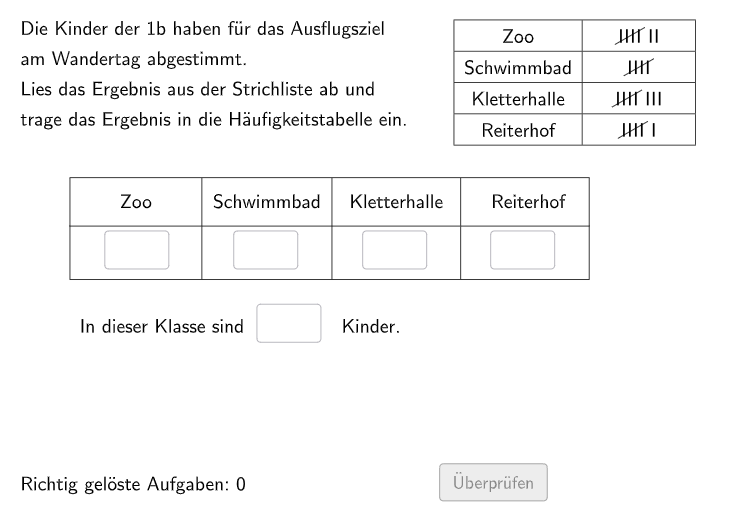
This GeoGebra example demonstrates how to use statistical charts to display the distribution of destinations. The core mathematical concepts involved include frequency statistics and data visualization. The construction points include using Shuffle, Sequence, Join commands to generate random data, and using Polygon, Element objects to draw statistical charts. It is suitable for middle school and high school statistics courses.
GeoGebra Commands & Parameters
Shuffle(Shuffle[Sequence[i, i, 2, 10]]) → RowEis, {7, 5, 8, 6, 10, 3, 4, 2, 9}Sequence(RowEis(i), i, 1, 4) → ShowEis, {7, 5, 8, 6}Join({{"$\textsf{Wähle aus!}$"}, ListeEis}) → SelectIceSequence(Random[1, 4], i, 1, 100) → IndexList, {3, 4, 1, 4, 1, 1, 2, 1, 2, 3, 4, 4, 2, 1, 2, 3, 3, 2, 3, 4, 4, 4, 3, 2, 3, 1, 2, 3, 1, 2, 1, 4, 2, 4, 3, 1, 3, 4, 3, 3, 3, 2, 1, 3, 4, 1, 1, 4, 3, 1, 2, 1, 4, 2, 1, 4, 3, 1, 4, 4, 2, 3, 2, 2, 1, 4, 4, 1, 3, 4, 2, 1, 2, 4, 1, 4, 3, 3, 2, 3, 4, 2, 1, 1, 4, 3, 3, 2, 4, 3, 3, 2, 2, 2, 2, 2, 2, 4, 1, 3}Max(ShowEis) → H1Max(Remove[ShowEis, {H1}]) → H2Max(Remove[ShowEis, {H1, H2}]) → H3Max(Remove[ShowEis, {H1, H2, H3}]) → H4Max(Remove[ShowEis, {H1, H2, H3, H4}]) → H5If(Index ≟ 1, H1, Index ≟ 2, H2, Index ≟ 3, H3, Index ≟ 4, H5) → Sol1Textfield(aInput) → InputBox1Textfield(bInput) → InputBox2Polygon(PtopLeftCornerFeedback, PtopRightCornerFeedback, PbottomRightCornerFeedback, PbottomLeftCornerFeedback) → Feedback5, ptopleftcornerfeedback, ptoprightcornerfeedback, pbottomrightcornerfeedback, pbottomleftcornerfeedbackShuffle(Sequence[Random[0, 10], i, 1, 100]) → randomNosForX, {3, 3, 4, 10, 2, 9, 9, 5, 0, 8, 9, 9, 9, 10, 0, 5, 5, 6, 0, 7, 6, 0, 6, 8, 5, 2, 3, 0, 2, 6, 1, 0, 8, 0, 3, 8, 7, 3, 10, 8, 3, 3, 4, 7, 4, 2, 10, 3, 10, 3, 1, 7, 4, 3, 1, 0, 1, 8, 6, 8, 4, 6, 5, 4, 0, 5, 7, 10, 9, 7, 5, 8, 8, 7, 4, 10, 1, 6, 10, 6, 4, 2, 1, 2, 3, 3, 7, 7, 1, 5, 7, 10, 10, 1, 10, 9, 0, 2, 3, 1}Element(randomNosForX, Mod[questionCount, 100] + 1) → numXShuffle(Sequence[Random[0, 10], i, 1, 100]) → randomNosForY, {2, 2, 9, 4, 6, 4, 7, 5, 10, 4, 4, 4, 4, 4, 1, 4, 4, 1, 7, 3, 3, 9, 2, 7, 4, 0, 6, 8, 1, 9, 6, 9, 8, 5, 0, 0, 5, 8, 1, 8, 7, 10, 6, 7, 6, 3, 1, 4, 6, 4, 10, 5, 6, 3, 7, 8, 1, 4, 4, 9, 4, 7, 3, 8, 3, 8, 3, 0, 2, 3, 7, 10, 1, 1, 7, 6, 5, 9, 7, 8, 2, 9, 0, 7, 0, 2, 3, 5, 4, 8, 5, 9, 10, 5, 2, 5, 2, 7, 7, 9}Element(randomNosForY, Mod[questionCount, 100] + 1) → numYAppend(true, Sequence[If[randomNosForX(i) ≟ randomNosForX(i - 1), false, true], i, 2, 100]) → stayXAppend(true, Sequence[If[randomNosForY(i) ≟ randomNosForY(i - 1), false, true], i, 2, 100]) → stayYRemove(Sequence[If[stayX(i), randomNosForX(i), 0], i, 1, 100], Sequence[0, i, 1, 100]) → randomNosForXwithoutRepeatRemove(Sequence[If[stayY(i), randomNosForY(i), 0], i, 1, 100], Sequence[0, i, 1, 100]) → randomNosForYwithoutRepeatElement(randomNosForXwithoutRepeat, Mod[questionCount, Length[randomNosForXwithoutRepeat]] + 1) → numXwithoutRepeatElement(randomNosForYwithoutRepeat, Mod[questionCount, Length[randomNosForYwithoutRepeat]] + 1) → numYwithoutRepeatSequence(Random[30, 45], i, 1, 30) → l1, {32, 31, 32, 40, 35, 30, 41, 43, 30, 44, 30, 43, 42, 37, 35, 34, 34, 36, 38, 34, 38, 38, 31, 39, 32, 38, 43, 30, 39, 34}Polygon(A, B, C, D) → v1, a, b, c, dDefined(((((aInput * bInput) * cInput) * dInput) * eInput)) → fixedTextfield(cInput) → InputBox3Textfield(dInput) → InputBox4Textfield(eInput) → InputBox5Sequence(Pos1 + (i * (dx, 0)), i, 0, 3) → InputPosPolygon(CornerFeedback, CornerFeedback + (length, 0), CornerFeedback + (length, height), CornerFeedback + (0, height)) → Feedback1, cornerfeedback, g, h, iTranslate(Feedback1, (dx, 0)) → Feedback2Translate(Feedback2, (dx, 0)) → Feedback3Translate(Feedback3, (dx, 0)) → Feedback4
AI Drawing Prompt Reference
Create a statistical chart to display the distribution of destinations. First, generate a set of random data, then use this data to draw a bar chart showing the frequency of each destination. Utilize random number generators and data processing commands to ensure accurate frequency statistics. Finally, draw the bar chart with the height of each bar representing the frequency of a destination.
The prompt above was compiled from the original drawing commands and is for reference only.