
Deriving the Hypocycloid Equations
Loading the math board and drawing, please wait…
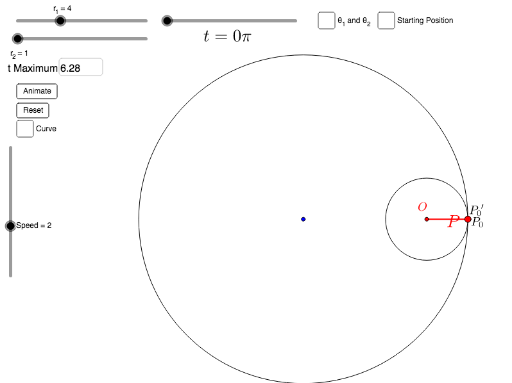
This GeoGebra example dynamically demonstrates the derivation of the hypocycloid equations, showing the trajectory traced by a point on a smaller circle rolling inside a larger circle. The core mathematical concepts include parametric equations, circle geometry, rotation and angle parameters, and locus construction. The construction uses the CurveCartesian command to define the parametric curve, along with Circle, Rotate, Arc, and Angle to build the geometric elements. Sliders control the rolling angle, and text fields/input boxes allow dynamic adjustment of parameters such as the radius ratio. Additional objects like Segment and Point help annotate key features. This resource is suitable for high school or undergraduate students studying analytic geometry, parametric equations, or mathematical modeling, and serves as an effective teaching tool for visualizing the generation and equation form of hypocycloids.
GeoGebra Commands & Parameters
CurveCartesian(((r_1 - r_2) * cos(t)) + (r_2 * cos(((r_1 - r_2) / r_2 * t))), ((r_1 - r_2) * sin(t)) - (r_2 * sin(((r_1 - r_2) / r_2 * t))), t, 0, b) → aSegment(O, P) → jTextfield(Max) → inputBox1Circle((0, 0), r_1) → cCircle((((r_1 - r_2) * cos(b)), ((r_1 - r_2) * sin(b))), r_2) → dRotate(O + ((-r_2), (-r_2)), ((r_1 + r_2) / r_2 * b), O) → FRotate(O + (r_2, (-r_2)), ((r_1 + r_2) / r_2 * b), O) → GArc(c, P_0, Rotate[P_0, b]) → eRotate(P_0, b) → P_0'Segment(A, P_0) → kRotate(P_0', (-b), O) → BSegment(B, O) → mAngle(P_0, A, O) → θ_1Angle(P, O, P_0') → θ_2Arc(d, P, P_0') → hSegment(A, P_0') → lAngle(B, O, P_0') → θ_1'
AI Drawing Prompt Reference
Create a dynamic diagram showing the generation of a hypocycloid: a large fixed circle, a smaller circle rolling inside it, and the trajectory traced by a point on the smaller circle. Include the large circle, small circle, the parametric curve, a segment connecting the center to the moving point, and text boxes for adjusting the radius ratio and rolling angle. Construct the large circle first, then the small circle, then define the trajectory curve, and finally add angle annotations and auxiliary segments.
The prompt above was compiled from the original drawing commands and is for reference only.