
Deriving the Area of a Trapezoid
Loading the math board and drawing, please wait…
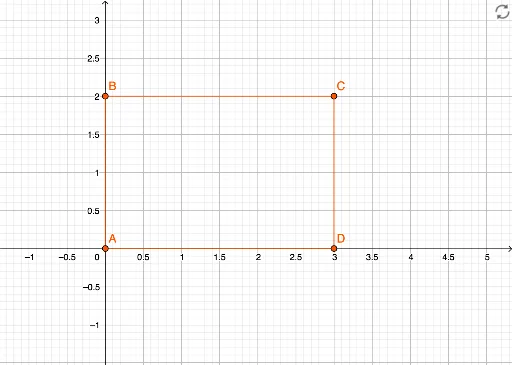
①This example demonstrates how to derive the area formula of a trapezoid through dynamic geometry, visually transforming the trapezoid into a shape with a known area formula (such as a parallelogram or rectangle). ②Core mathematical concepts include the trapezoid area formula, bases, height, midsegment, and the idea of area conservation through geometric transformation. ③Construction: Based on the construction summary, GeoGebra commands such as Intersect, Point, and Segment are used to create vertices A, B, C, D and sides f, g, h, i, enabling auxiliary constructions for comparison. ④Suitable for middle school geometry lessons or self-study, helping learners understand the origin of the formula and develop geometric intuition and reasoning skills.
GeoGebra Commands & Parameters
Intersect(xAxis, yAxis) → APoint(yAxis) → BPoint(xAxis) → DSegment(B, C) → fSegment(D, C) → gSegment(D, A) → hSegment(A, B) → i
AI Drawing Prompt Reference
Draw a coordinate plane with two perpendicular axes. Mark their intersection as one vertex of a trapezoid. Place a second vertex on the vertical axis)Skip and a third vertex on the horizontal axis. Choose a fourth point in the plane to complete the trapezoid. Connect the four vertices in order to form the trapezoid, with the two axis-aligned sides serving as the bases and the other two sides as the legs. The figure should clearly show the four vertices and four sides, making it easy to observe the relationship between the area and the bases and height.
The prompt above was compiled from the original drawing commands and is for reference only.