
Derive the Area Formula for Any Parallelogram
Loading the math board and drawing, please wait…
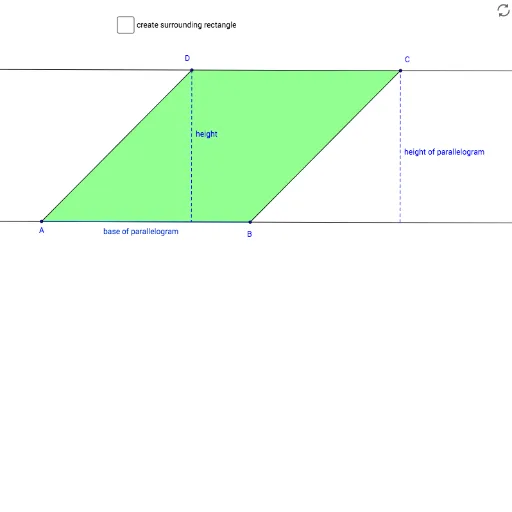
This example demonstrates how to derive the area formula for any parallelogram using geometric transformations. Key mathematical concepts include properties of parallelograms, vectors, and geometric transformations. It utilizes commands such as Segment, Line, Intersect, OrthogonalLine, Polygon, Angle, Vector, and Translate in GeoGebra. Suitable for middle school and above students learning geometric transformations and area calculation.
GeoGebra Commands & Parameters
Segment(A, B) → fLine(D, f) → gSegment(D, A) → hLine(B, h) → iIntersect(g, i) → CSegment(B, C) → jOrthogonalLine(A, f) → kIntersect(g, k) → EPolygon(D, E, A) → poly2, a_1, c_1, eOrthogonalLine(C, g) → lOrthogonalLine(A, k) → mIntersect(l, m) → FPolygon(C, B, F) → poly3, f_1, d_1, b_1OrthogonalLine(D, a_1) → nIntersect(m, n) → GAngle(A, E, D) → αAngle(C, F, B) → βSegment(F, C) → qPolygon(A, B, C, D) → q1, a, b_2, c, dVector(A, B) → vTranslate(D, v) → D'Translate(E, v) → E'Translate(A, v) → A'Polygon(D', E', A') → poly2', a', d', e'Segment(A, E) → pOrthogonalLine(D, g) → rIntersect(m, r) → HSegment(D, H) → sPolygon(E', E, A, B) → q2, e'_1, e_1, a_2, bPoint(a_1) → IPoint(d_1) → JPolygon(C, I, A, J) → q3, c_2, i_1, a_3, j_1Angle(poly2') → γ, δ, εAngle(q2) → ζ, η, θ, ιAngle(I, C, F) → κ
AI Drawing Prompt Reference
Draw a parallelogram ABCD, then use vector AB to translate points D, E, and A to D', E', and A' to form a new parallelogram D'E'A'. Construct line segment AE through point A and point E, and line segment DH through point D and G. Finally, construct another parallelogram CBF through points C, B, and F. The process involves properties of parallelograms, vectors, and translations.
The prompt above was compiled from the original drawing commands and is for reference only.