
Demonstration of Two Vectors and Their Intersection
Loading the math board and drawing, please wait…
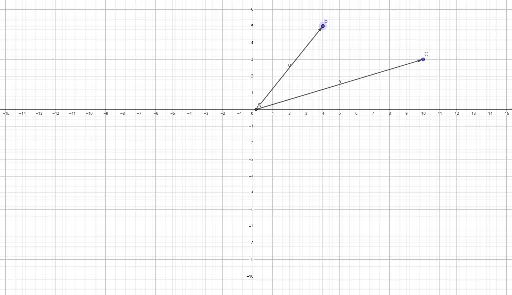
This example demonstrates the definition and spatial relationship between two vectors in a 2D plane. It focuses on core mathematical concepts such as vector direction, magnitude, and the calculation of intersection points. The construction utilizes the 'Vector' command to create vectors u and v, and the 'Intersect' command to determine the intersection points A, B, and C. This resource is ideal for high school students learning the basics of linear algebra or for educators illustrating coordinate geometry and vector interactions.
GeoGebra Commands & Parameters
Intersect(xAxis, yAxis) → AVector(A, B) → uVector(A, C) → v
AI Drawing Prompt Reference
Draw two vectors u and v in a 2D plane, with vector u starting from point A and pointing to point B, and vector v starting from point A and pointing to point C. First, draw the intersection point A of the x-axis and y-axis, then draw vector u from A to B, and finally draw vector v from A to C.
The prompt above was compiled from the original drawing commands and is for reference only.