
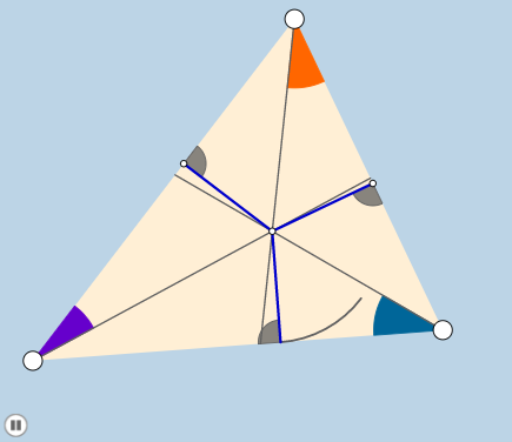
Demonstration of Incircle
Loading the math board and drawing, please wait…
This example demonstrates the dynamic changes of the incircle of a triangle. Key mathematical concepts include the incircle, angles, segments, and geometric transformations. Using GeoGebra commands such as Line, Circle, Incircle, and Rotate, it vividly shows the relationship between the incircle and the sides of the triangle. Suitable for students at the junior high school level and above to learn about geometric transformations and the concept of incircle.
GeoGebra Commands & Parameters
Line(A, B) → dSlope(d) → aPointIn(c) → CLine(A, C) → eLine(B, C) → fAngle(B, A, C) → αAngle(A, C, B) → βAngle(C, B, A) → γSegment(A, C) → gSegment(C, B) → hSegment(B, A) → iMin(list1) → jCircle(C, (0.2 * j)) → qCircle(A, (0.2 * j)) → pCircle(B, (0.2 * j)) → kIntersect(q, f, 2) → DIntersect(q, e, 1) → EIntersect(q, e, 2) → FIntersect(p, e, 2) → GIntersect(p, d, 1) → HIntersect(k, f, 2) → I_2Intersect(k, d, 2) → JIntersect(d, i) → KIntersect(d, i) → LIntersect(k, f, 1) → NIntersect(p, e, 1) → OIntersect(p, d, 2) → PAngle(D, C, E) → δAngle(O, A, P) → εAngle(J, B, I_2) → ηAngle(G, A, H) → θIncircle(A, B, C) → rCenter(r) → ILine(C, I) → lLine(A, I) → nLine(B, I) → sIntersect(e, s) → RIntersect(d, l) → SIntersect(f, n) → TPolygon(A, B, C) → poly1, c_1, a_1, b_1Rotate(D, δ / 2, C) → D'Angle(D, C, D') → κRotate(J, η / 2, B) → J'Angle(J, B, J') → λRay(C, D') → tRay(B, J') → e_1Rotate(O, ε / 2, A) → O'Angle(O, A, O') → ιRay(A, O') → d_1Segment(C, S) → f_1Segment(A, T) → g_1Segment(B, R) → h_1Intersect(q, f_1, 1) → UIntersect(q, f, 1) → VIntersect(p, g_1, 1) → WIntersect(k, h_1, 1) → ZCircleSector(C, E, U) → k_1CircleSector(A, P, W) → q_1CircleSector(B, I_2, Z) → p_1Dilate(C, If[0 < m ≤ 1, 1 - m, 0], S) → C'Segment(C, C') → i_1Rotate(k_1, If[1 < m ≤ 2, ((m - 1) * β / 2), β / 2], C) → r_1Dilate(B, If[2 < m ≤ 3, 3 - m, 0], R) → B'Segment(B, B') → j_1Rotate(p_1, If[3 < m ≤ 4, ((m - 3) * γ / 2), γ / 2], B) → s_1Dilate(A, If[4 < m ≤ 5, 5 - m, 0], T) → A'Segment(A, A') → l_1Rotate(q_1, If[5 < m ≤ 6, ((m - 5) * α / 2), α / 2], A) → t_1OrthogonalLine(I, f) → m_1OrthogonalLine(I, d) → n_1OrthogonalLine(I, e) → a_2Intersect(f, m_1) → MIntersect(d, n_1) → A_1Intersect(e, a_2) → B_1Segment(I, M) → b_2Circle(M, (0.2 * b_2)) → c_2Intersect(c_2, f, 1) → C_1Intersect(c_2, b_2, 1) → D_1Intersect(c_2, f, 2) → E_1CircleSector(M, E_1, D_1) → d_2Dilate(I, If[6 < m ≤ 7, 7 - m, 0], M) → Q'Segment(I, Q') → e_2Rotate(d_2, If[7.5 < m ≤ 8.5, ((m - 7.5) * π / 2), 1.5707963267948966], M) → f_2Segment(I, B_1) → g_2Segment(I, A_1) → h_2Circle(B_1, (0.2 * g_2)) → k_2Circle(A_1, (0.2 * h_2)) → p_2Intersect(k_2, e, 2) → F_1Intersect(k_2, g_2, 1) → G_1Intersect(k_2, e, 1) → H_1Intersect(p_2, d, 2) → I_1Intersect(p_2, h_2, 1) → J_1Intersect(p_2, d, 1) → K_1Dilate(I, If[8.5 < m ≤ 9.5, 9.5 - m, 0], B_1) → Q'_1Segment(I, Q'_1) → i_2CircleSector(B_1, H_1, G_1) → q_2CircleSector(A_1, I_1, J_1) → r_2Rotate(q_2, If[10 < m ≤ 11, ((m - 10) * π / 2), 1.5707963267948966], B_1) → s_2Dilate(I, If[11 < m ≤ 12, 12 - m, 0], A_1) → Q'_2Segment(I, Q'_2) → j_2Rotate(r_2, If[12.5 < m ≤ 13.5, ((m - 12.5) * π / 2), 1.5708], A_1) → t_2Angle(M, I, B_1) → ζAngle(B_1, I, A_1) → μAngle(A_1, I, M) → νRotate(I, If[14 < m ≤ 15, ((m - 14) * ζ), ζ], I) → Q'_3Rotate(Q', If[14 < m ≤ 15, ((m - 14) * ζ), ζ], I) → Q''Segment(Q'_3, Q'') → l_2Rotate(Q'_3, If[15 < m ≤ 16, ((m - 15) * μ), μ], I) → L_1Rotate(Q'', If[15 < m ≤ 16, ((m - 15) * μ), μ], I) → Q'''Segment(L_1, Q''') → m_2Rotate(A_1, If[16 < m ≤ 18, ((m - 16) * π), 6.28319], I) → M'Intersect(m_1, f) → QCircle(I, Q) → d_3Line(A, B) → n_2CircleArc(I, A_1, M') → c_3Segment(I, C) → f_3Intersect(d_3, f_3) → M_1,Segment(A, M_1) → g_3Segment(B, M_1) → h_3Segment(B_1, M) → i_3Intersect(g_3, i_3) → N_1Intersect(h_3, i_3) → O_1Intersect(f_3, i_3) → P_1Dilate(I, If[20 < m ≤ 21, 21 - m, 0], M_1) → I'Segment(I, I') → j_3Dilate(M_1, If[21 < m ≤ 22, 22 - m, 0], C) → Q_1Segment(M_1, Q_1) → k_3Dilate(A, If[22 < m ≤ 23, 23 - m, 0], N_1) → A'_1Segment(A, A'_1) → l_3Dilate(N_1, If[23 < m ≤ 24, 24 - m, 0], M_1) → R_1Segment(N_1, R_1) → m_3Dilate(B, If[22 < m ≤ 23, 23 - m, 0], O_1) → B'_1Dilate(O_1, If[23 < m ≤ 24, 24 - m, 0], M_1) → S_1Segment(B, B'_1) → n_3Segment(O_1, S_1) → p_3Dilate(B_1, If[24 < m ≤ 25, 25 - m, 0], N_1) → T_1Segment(B_1, T_1) → q_3Dilate(N_1, If[25 < m ≤ 26, 26 - m, 0], P_1) → U_1Segment(N_1, U_1) → r_3Dilate(P_1, If[26 < m ≤ 27, 27 - m, 0], O_1) → V_1Segment(P_1, V_1) → s_3Dilate(O_1, If[27 < m ≤ 28, 28 - m, 0], M) → W_1Segment(O_1, W_1) → t_3Midpoint(B_1, O_1) → Z_1Rotate(B_1, If[28 < m ≤ 29, ((m - 28) * π), π], Z_1) → A_2Rotate(T_1, If[28 < m ≤ 29, ((m - 28) * π), π], Z_1) → B_2Segment(A_2, B_2) → a_3Midpoint(N_1, M) → C_2Rotate(N_1, If[29 < m ≤ 30, ((m - 29) * π), π], C_2) → D_2Rotate(U_1, If[29 < m ≤ 30, ((m - 29) * π), π], C_2) → E_2Segment(D_2, E_2) → b_3
AI Drawing Prompt Reference
Draw a triangle with its incircle. Connect the incenter to each vertex, creating three angle bisectors. At each vertex, draw a small circle centered at that vertex with radius equal to one-fifth of the shortest side length. These small circles intersect the triangle's sides, producing multiple points. From each vertex, draw a ray that bisects the angle formed by the small circle and the adjacent sides. Mark the points where the incircle touches the sides. Finally, connect these touch points to form an inner triangle, and label all relevant angles.
The prompt above was compiled from the original drawing commands and is for reference only.