
Demonstration of Geometric Transformations
Loading the math board and drawing, please wait…
In collections
Rotations
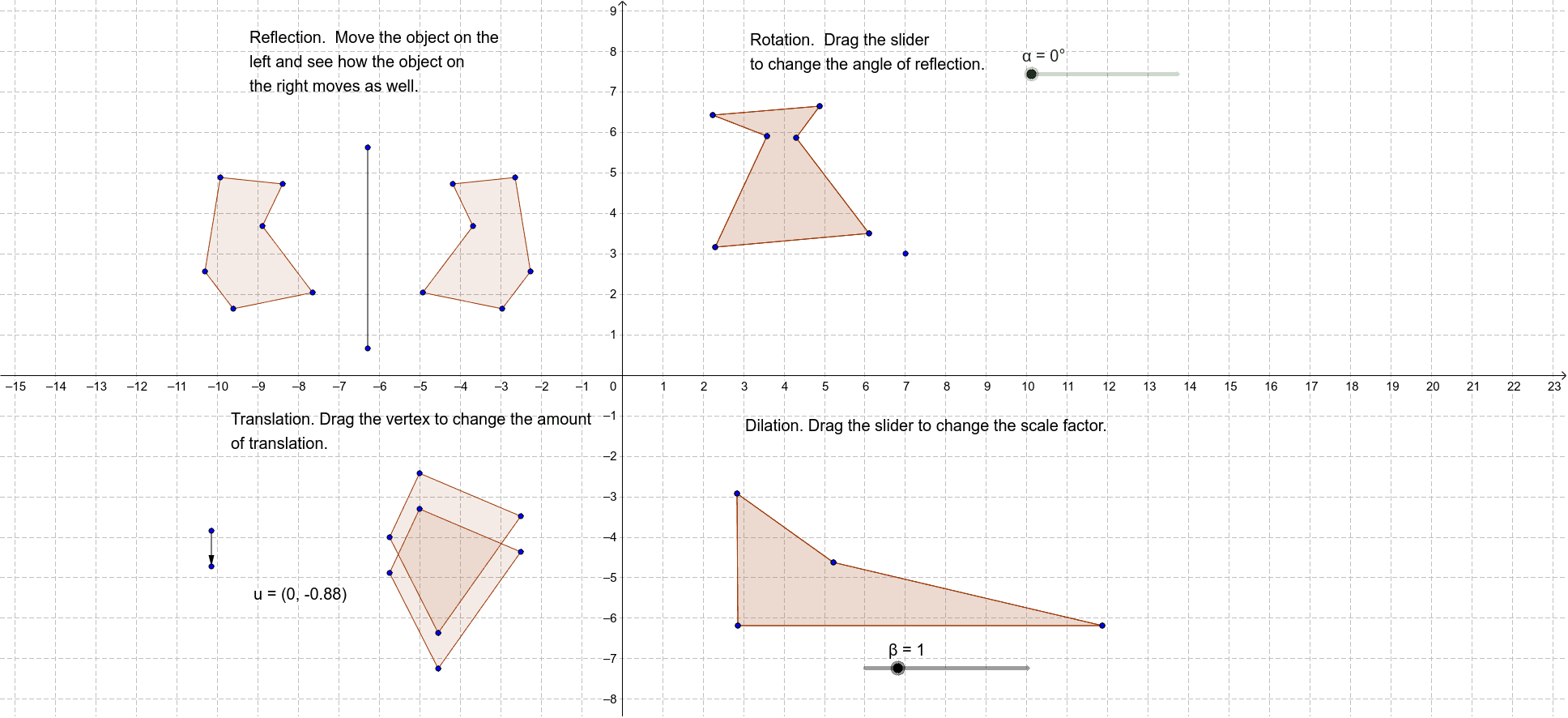
This example demonstrates the main types of transformations in 2D geometry, including translation, reflection, rotation, and dilation. It involves core math concepts like transformations, vectors, and polygon construction. GeoGebra commands and objects used include Polygon, Segment, Mirror, Rotate, Vector, Translate, and Dilate. Suitable for high school and above students to learn and understand the properties and applications of geometric transformations.
GeoGebra Commands & Parameters
Polygon(A, B, C, D, E, F) → poly1, a, b, c, d, e, fSegment(G, H) → gPolygon(I, J, K, L, M, N) → poly2, i, j, k, l, m, nMirror(A, g) → A'Mirror(B, g) → B'Mirror(C, g) → C'Mirror(D, g) → D'Mirror(E, g) → E'Mirror(F, g) → F'Polygon(A', B', C', D', E', F') → poly1', a', b', c', d', e', f'Rotate(I, α, O) → I'Rotate(J, α, O) → J'Rotate(K, α, O) → K'Rotate(L, α, O) → L'Rotate(M, α, O) → M'Rotate(N, α, O) → N'Polygon(I', J', K', L', M', N') → poly2', i', j', k', l', m', n'Polygon(P, Q, R, S) → poly3, p, q, r, sVector(T, U) → uTranslate(P, u) → P'Translate(Q, u) → Q'Translate(R, u) → R'Translate(S, u) → S'Polygon(P', Q', R', S') → poly3', p', q', r', s'Polygon(V, W, Z, A_1) → poly4, v, w, z, a_1Dilate(V, β, W) → V'Dilate(W, β, W) → W'Dilate(Z, β, W) → Z'Dilate(A_1, β, W) → B_1Polygon(V', W', Z', B_1) → poly4', v', w', z', b_1
AI Drawing Prompt Reference
Draw a hexagon formed by six points, then reflect it across a line segment to get a new hexagon. Rotate the second hexagon around a point by a certain angle to obtain a rotated hexagon. Next, draw a quadrilateral, translate it using a vector to get a translated quadrilateral. Finally, draw another quadrilateral, scale it from a point to get a scaled quadrilateral.
The prompt above was compiled from the original drawing commands and is for reference only.