
Demonstrating Subtraction of Negatives
Loading the math board and drawing, please wait…
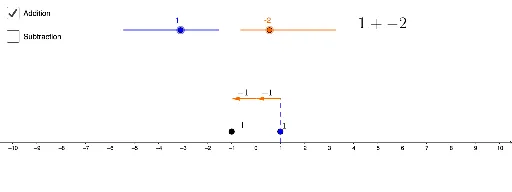
This example visually demonstrates the geometric interpretation of subtracting negatives using dynamic geometry. It illustrates the process of subtracting two negative numbers on a number line. Key math concepts include number line, opposite numbers, absolute value, and subtraction operation rules. Construction highlights involve using Segment and Sequence commands to create axes and dynamic points, with objects like a, b, c, d representing values, add and sub for calculations, and text1-text4 for step-by-step display. The function f defines the graph, while lists 1-4 store data. Suitable for middle school students and above to understand negative operations, and as a teaching aid for number-image combination in high school mathematics.
GeoGebra Commands & Parameters
Segment((x(A), 0), (x(A), 2)) → fSequence(Vector[(x(A) + i, 2), (x(A) + i + 1, 2)], i, 0, b - 1, 1) → list1Sequence(Vector[(x(A) + i, 2), (x(A) + i - 1, 2)], i, b + 1, 0, 1) → list2Sequence(Vector[(x(A) - i, 2), (x(A) - i - 1, 2)], i, 0, b - 1, 1) → list3Sequence(Vector[(x(A) - i, 2), (x(A) - i + 1, 2)], i, b + 1, 0, 1) → list4
AI Drawing Prompt Reference
Draw a horizontal line segment as a number line in a coordinate system and represent values with dynamic points. Use vector sequences to create multiple segments extending right and left on the number line to visualize subtracting two negative numbers geometrically. Display calculation steps with text and highlight concepts of opposite numbers and absolute value.
The prompt above was compiled from the original drawing commands and is for reference only.