
Data Modeling: Building Function Models with Parabolas, Exponentials, and Hyperb
Loading the math board and drawing, please wait…
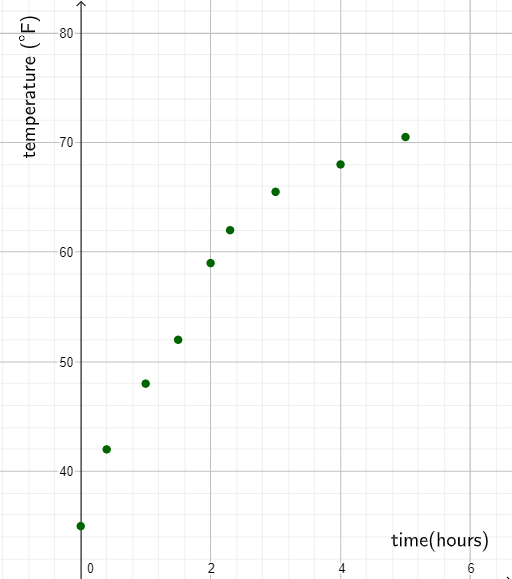
This example demonstrates how to construct and compare function-based models for data so that observed trends can be visualized, interpreted, and used for prediction. Key concepts include quadratic functions (parabolas), exponential functions (growth/decay behavior), rational numbers and percentages for parameter/scale representation, and hyperbolic (reciprocal-type) relationships. The GeoGebra construction is organized around annotation and parameter-driven objects: text1 and text2 provide explanatory labels and value notes; sets of points A1–A12, B1–B12, and D2–D12 represent key data locations and supporting values; parameters a_{1}, b_{1}, and c define the model coefficients/constant terms used to generate the corresponding curves. By switching among different function families (parabola, exponential, hyperbola), the model-building workflow highlights how different mathematical forms can capture the same data phenomenon. Suitable for middle to high school, introductory math modeling lessons, and graphing-based function instruction in GeoGebra.
GeoGebra Commands & Parameters
0350.4122.31.53452.775.7424859625265.56870.552.347.1(A2, B2)(A3, B3)(A4, B4)(A5, B5)(A6, B6)(A7, B7)(A8, B8)(A9, B9)(A10, B10)(A11, B11)(A12, B12)Boolean a_{1}(true)Boolean b_{1}(true)Boolean c(true)Boolean d(true)Boolean e(true)Boolean h(true)Boolean i(true)Boolean j(false)Boolean k(true)Boolean l(false)Boolean m(true)
AI Drawing Prompt Reference
Create a coordinate plane for data modeling with three sets of scatter points: one set following a parabolic trend, another showing exponential growth or decay, and a third reflecting a hyperbolic (reciprocal) relationship. Add two text labels explaining the model types and parameter meanings. Use sliders or parameters to control the coefficients (quadratic term, exponential base, constant) for three fitted curves, and display the corresponding function graphs. Distinguish the point sets by color or shape, and match each curve to its data points. Arrange everything clearly to compare how different function families fit the same dataset.
The prompt above was compiled from the original drawing commands and is for reference only.