
Cylinder Volume & Total Surface Area Practice
Loading the math board and drawing, please wait…
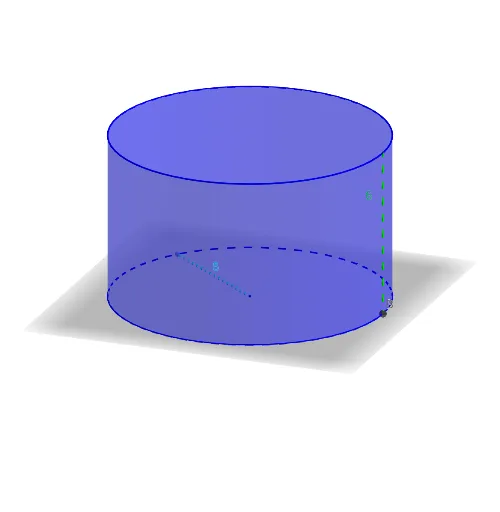
① This GeoGebra example provides an interactive practice for calculating the volume and total surface area of a cylinder, allowing users to input radius and height to see real-time results. ② Core math concepts include the volume formula V=πr²h, total surface area as the sum of lateral and base areas, and numerical computation. ③ Construction highlights: Circle command creates the base, Cylinder generates the 3D solid, Point and Segment define radius and height, Text and Textfield enable interactive input, while Volume, TotalSA, ViewSol, and Code display outputs and solutions. ④ Suitable for middle and high school students learning solid geometry, ideal for classroom exercises or self-study to reinforce formula understanding and spatial reasoning.
GeoGebra Commands & Parameters
Circle(C, radius, xOyPlane) → cCylinder(c, height) → a, d, bPoint(c) → ASegment(C, A) → fSegment(B, D) → gText(V) → text1Text(TSA) → text2Textfield(ViewSol) → Code
AI Drawing Prompt Reference
Draw a cylinder to demonstrate the calculation of its volume and total surface area. The cylinder consists of a circular base and a rectangular lateral surface, with the base centered and perpendicular to the side. Mark the center of the base and draw the radius, then draw the height of the cylinder. Add sliders to control the radius and height, displaying the real-time calculated volume and surface area. Label the volume formula V=πr²h and the surface area formula TSA=2πrh+2πr² near the diagram, along with the calculation steps and formulas.
The prompt above was compiled from the original drawing commands and is for reference only.