
Cylinder by JM Arranz, JA Mora, M Sada y R Losada
Loading the math board and drawing, please wait…
In collections
geometriadinamica.es
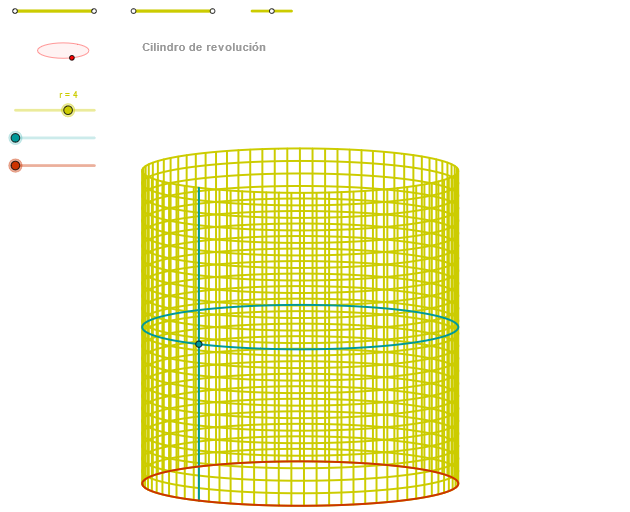
This example demonstrates the construction of a cylinder. Key mathematical concepts include circles, solid geometry, and geometric construction. Using GeoGebra commands such as Segment, Circle, and Intersect, various parts of the cylinder can be constructed. Suitable for middle school and above students or teachers.
GeoGebra Commands & Parameters
Segment(Q3, Q4) → p2Point(p2) → P3Segment(P3, Q4) → p4Point(p4) → P4Segment(Q1, Q2) → p1Point(p1) → P1Segment(P1, Q2) → p3Point(p3) → P2OrthogonalLine(C, xAxis) → zz2Circle(C, 0.62) → zz0Intersect(zz0, zz2, 1) → ZZ4Intersect(zz0, zz2, 2) → ZZ3Ellipse(ZZ3, ZZ4, 0.65) → zElipse2Point(zElipse2) → ZIntersect(zElipse2, zz2) → ZZ7, ZZ8Angle(ZZ8, C, Z) → zAngIncOrthogonalLine(C, yAxis) → zz1Intersect(zz0, zz1, 2) → ZZ2Intersect(zz0, zz1, 1) → ZZ1Ellipse(ZZ1, ZZ2, 0.65) → zElipse1Point(zElipse1) → XYIntersect(zElipse1, zz1) → ZZ5, ZZ6Angle(ZZ6, C, XY) → zAngRotSegment(Q5, Q6) → p5Point(p5) → P5Segment(ZZ5, ZZ6) → zz4Segment(ZZ7, ZZ8) → zz3Intersect(zElipse2, zElipse1, 1) → zPunto1Intersect(zElipse2, zElipse1, 4) → zPunto2Segment(zPunto1, zPunto2) → zSeg2CurveCartesian((r * ((cos(α) * sin(zAngRot)) + (sin(α) * cos(zAngRot)))), (r * ((((-cos(α)) * cos(zAngRot)) * sin(zAngInc)) + ((sin(α) * sin(zAngRot)) * sin(zAngInc)) + (v * cos(zAngInc)))), v, v1, v2) → curva2CurveCartesian((r * ((cos(u) * sin(zAngRot)) + (sin(u) * cos(zAngRot)))), (r * ((((-cos(u)) * cos(zAngRot)) * sin(zAngInc)) + ((sin(u) * sin(zAngRot)) * sin(zAngInc)) + (β * cos(zAngInc)))), u, u1, u2) → a1CurveCartesian((r * ((cos(u) * sin(zAngRot)) + (sin(u) * cos(zAngRot)))), (r * ((((-cos(u)) * cos(zAngRot)) * sin(zAngInc)) + ((sin(u) * sin(zAngRot)) * sin(zAngInc)))), u, u1, u2) → curva1ASequence(CurveCartesian[(r * ((cos(u) * sin(zAngRot)) + (sin(u) * cos(zAngRot)))), (r * ((((-cos(u)) * cos(zAngRot)) * sin(zAngInc)) + ((sin(u) * sin(zAngRot)) * sin(zAngInc)) + (v * cos(zAngInc)))), v, v1, v2], u, u1, u2, paso) → list2Sequence(CurveCartesian[(r * ((cos(u) * sin(zAngRot)) + (sin(u) * cos(zAngRot)))), (r * ((((-cos(u)) * cos(zAngRot)) * sin(zAngInc)) + ((sin(u) * sin(zAngRot)) * sin(zAngInc)) + (v * cos(zAngInc)))), u, u1, u2], v, v1, v2, paso) → list1
AI Drawing Prompt Reference
Draw a 3D cylinder with an elliptical base and top, connected by a curved surface. Start by constructing two intersecting ellipses representing the bottom and top faces, and determine their centers and rotation axes. Pick a point on the bottom ellipse and use the line from it to the center to set the tilt angle. Then generate a series of parallel curves extending from the bottom ellipse outline to the top ellipse, forming the cylinder's side. Finally, add two auxiliary segments connecting corresponding points on the top and bottom ellipses to indicate the cylinder's height and direction. The overall figure includes two ellipses, several surface curves, and auxiliary segments, showing a solid cylinder.
The prompt above was compiled from the original drawing commands and is for reference only.