
Cylinder and Sphere Construction
Loading the math board and drawing, please wait…
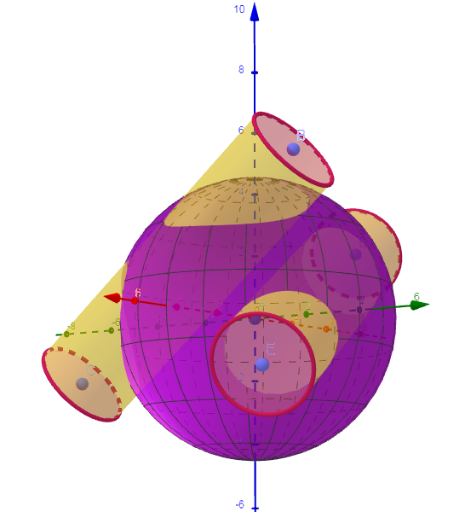
This example demonstrates how to construct a cylinder and a sphere using GeoGebra. The core mathematical concepts involved are the properties of cylinders and spheres in solid geometry. The commands used in the construction include Sphere, PointIn, Cylinder, UnitVector, and Surface. Suitable for high school or university-level solid geometry courses.
GeoGebra Commands & Parameters
Sphere(A, R + r) → aPointIn(a) → BPointIn(a) → CPointIn(a) → DPointIn(a) → ECylinder(C, B, r) → b, c, d, eCylinder(E, D, r) → f, g, h, iSphere(A, R) → jUnitVector(Vector[B, C]) → uUnitVector(Vector[D, E]) → vSurface(If[abs((A + (R; arg; alt) - B) ⊗ u) ≥ r ∧ abs((A + (R; arg; alt) - D) ⊗ v) ≥ r, A + (R; arg; alt)], arg, 0, (2 * π), alt, ((-π)) / 2, π / 2) → k
AI Drawing Prompt Reference
Create a 3D solid-geometry diagram showing both a cylinder and a sphere. First, define a sphere surface centered at a common reference position with a chosen radius (and also prepare a larger offset radius for the construction), and select several points that lie on that sphere surface to serve as anchor locations. Using these points, construct cylindrical surfaces with the same radius, building one cylinder from one pair of sphere points and another from a second pair. Then add a second sphere centered at the same reference with the smaller radius. Finally, draw an additional surface whose shape is determined by intersection/envelope conditions, using the direction implied by the vectors between the selected point pairs and restricting the surface over the specified angular and height ranges.
The prompt above was compiled from the original drawing commands and is for reference only.