
Cylinder and Point
Loading the math board and drawing, please wait…
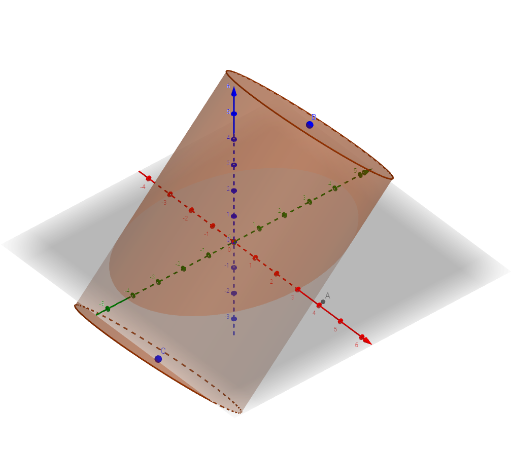
This example demonstrates the spatial relationship between a cylinder and a point in 3D space, using GeoGebra's 3D view to visually show whether the point lies on, inside, or outside the cylindrical surface. The core mathematical concepts involve solid geometry definitions of a cylinder, coordinate representation of points in space, and positional classification relative to a curved surface. Construction highlights: the Cylinder command is used to create the cylinder, while point objects A, B, C and auxiliary objects a, c, d, b (likely radius, height, or direction vectors) define the cylinder's geometric parameters and the point's location. Suitable for high school or early college students to understand 3D geometric construction and point-solid relationships, and serves as an interactive teaching tool for solid geometry.
GeoGebra Commands & Parameters
Cylinder(C, B, 3) → a, c, d, b
AI Drawing Prompt Reference
Draw a cylinder and a point in 3D space to demonstrate the positional relationship between the point and the cylindrical surface, such as whether the point lies on, inside, or outside the cylinder. The cylinder is defined by an axis and a radius, while the point is specified by coordinates. First construct the cylinder, then place the point to observe its relative position to the cylinder's surface, illustrating the concept of point-surface relationships in spatial geometry.
The prompt above was compiled from the original drawing commands and is for reference only.