
Cuboid with Cross-Sections by wallace duque silva
Loading the math board and drawing, please wait…
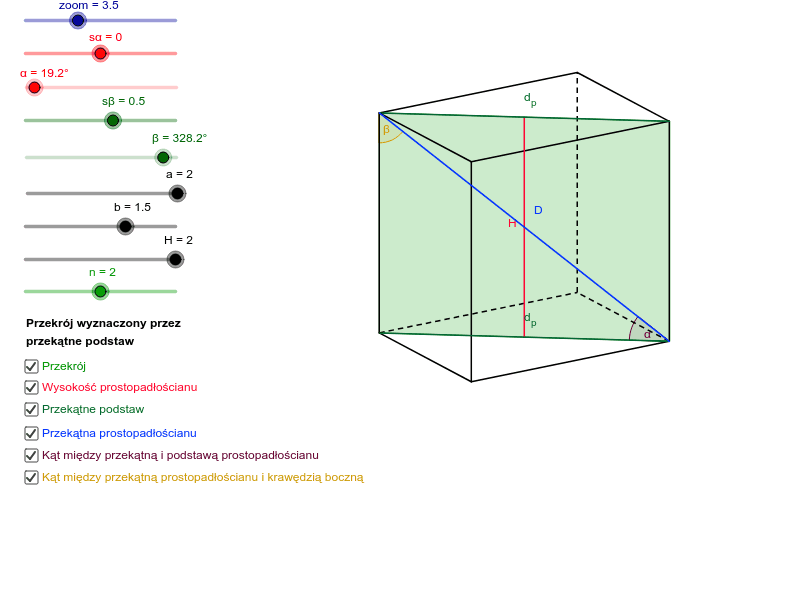
This example demonstrates a cuboid with three types of cross-sections: midpoints of parallel edges of the base, diagonals of the base, and diagonals of side faces. It involves core concepts in solid geometry, including midpoints, diagonals, and angle calculations. Construction highlights include using commands like Midpoint, Odcinek_3D, If, Segment, and Angle. Suitable for high school geometry education and geometric construction learning.
GeoGebra Commands & Parameters
Midpoint(D7, D8) → GMidpoint(D5, D6) → FMidpoint(D3, D4) → EMidpoint(D1, D2) → DOdcinek_3D(D8, D4, D7, D6) → c, dOdcinek_3D(D8, D6, D4, D7) → e, fOdcinek_3D(D8, D7, D6, D4) → g, hOdcinek_3D(D7, D3, D5, D8) → i, jOdcinek_3D(D7, D5, D8, D3) → k, lOdcinek_3D(D5, D1, D6, D7) → m, n_1Odcinek_3D(D5, D6, D7, D1) → p, qOdcinek_3D(D6, D2, D8, D5) → s, tOdcinek_3D(D2, D1, D4, D6) → a_1, b_1Odcinek_3D(D2, D4, D6, D1) → c_1, d_1Odcinek_3D(D1, D3, D2, D5) → e_1, f_1Odcinek_3D(D3, D4, D1, D7) → g_1, h_1If(n ≟ 1 ∧ p_1, Polygon[D, E, G, F]) → wielokąt1If(n ≟ 2 ∧ p_1, Polygon[D1, D4, D8, D5]) → wielokąt2If(n ≟ 3 ∧ p_1, Polygon[D1, D2, D8, D7]) → wielokąt3Segment(D, F) → i_1Segment(E, G) → j_1Segment(D, E) → k_1Segment(F, G) → l_1Segment(F, E) → m_1Angle(G, F, E) → γAngle(F, E, G) → δMidpoint(D1, D4) → BMidpoint(D5, D8) → CSegment(B, C) → s_1Segment(D1, D4) → t_1Segment(D5, D8) → a_2Segment(D5, D4) → b_2Angle(D8, D5, D4) → εAngle(D5, D4, D8) → ζSegment(D1, D8) → c_2Segment(D2, D8) → e_2Segment(D1, D7) → f_2Angle(D2, D8, D6) → ηAngle(D6, D2, D8) → θAngle(D7, D8, D1) → ιAngle(D7, D1, D8) → κ
AI Drawing Prompt Reference
Draw a cuboid and show three types of cross-sections: midpoints of the base, diagonals of the base, and diagonals of the side faces. Start by drawing the vertices of the cuboid, then connect the midpoints of the base to form the midpoints of the base cross-section, next connect the diagonals of the base and side faces to form the base diagonals and side face diagonals cross-sections, and finally calculate and mark the angles between these cross-sections.
The prompt above was compiled from the original drawing commands and is for reference only.