
Cuboid - Surface Diagonal and Diagonal Plane
Loading the math board and drawing, please wait…
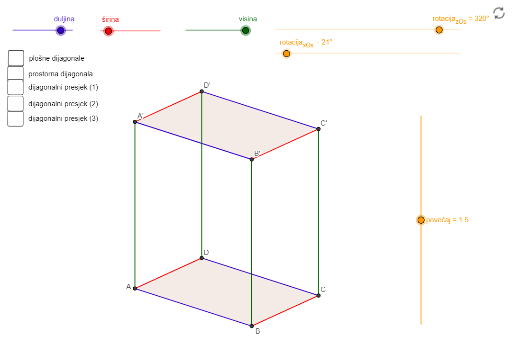
This example demonstrates the surface diagonal and diagonal plane of a cuboid. Key mathematical concepts include the diagonal and diagonal plane in solid geometry. Using GeoGebra commands such as Intersect, Point, Vector, and Polygon, the cuboid and its diagonals and diagonal plane can be constructed. Suitable for middle school and above students to learn solid geometry.
GeoGebra Commands & Parameters
Intersect(xAxis, yAxis) → OPoint(xAxis) → UPoint(yAxis) → VVector(O, U) → uVector(O, V) → vVector(O, J) → jVector(O, K) → kVector(O, I) → iPolygon(A, B, C, D) → baza_1, a, b, c, dPolygon(A', B', C', D') → baza_2, a', b', c', d'Segment(A, A') → eSegment(D, D') → fSegment(B, B') → gSegment(C, C') → hSegment(B, C') → plošnDij_1Segment(B, D) → plošnDij_2Segment(B, A') → plošnDij_3Segment(A, C') → prostDijagSegment(A, C) → plošnDijagPolygon(A, C, C') → prostTrok, c'_1, a_1, c_1Angle(A, C, C') → αPolygon(A', B, C, D') → dijagPresj_3, a'_1, b_1, c_2, d'_1Polygon(D, B, B', D') → dijagPresj_2, d_1, b_2, b'_1, d'_2Polygon(B, C', D', A) → dijagPresj_1, b_3, c'_2, d'_3, a_2
AI Drawing Prompt Reference
Draw a cuboid with its surface diagonal and diagonal plane. Start by taking points O, U, and V on the x-axis and y-axis, then construct vectors u and v. Next, construct vectors j, k, and i from point O. Use these vectors and points to construct the bottom faces baza_1 and baza_2, and the side segments e, f, g, and h. Then, construct the diagonal lines plošnDij_1, plošnDij_2, plošnDij_3, and prostDijag, as well as the diagonal plane polygons prostTrok, dijagPresj_1, dijagPresj_2, and dijagPresj_3.
The prompt above was compiled from the original drawing commands and is for reference only.