
Cube with Diagonal Cupolaic Blends
Loading the math board and drawing, please wait…
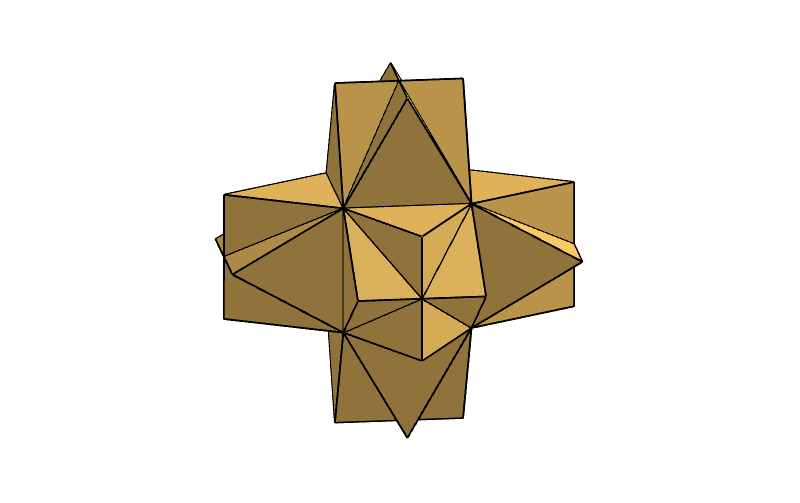
This example demonstrates a three‑dimensional model of a cube augmented with diagonal cupolaic blends. It covers core concepts in solid geometry, polyhedron construction, spatial transformations, and symmetry. The construction employs GeoGebra commands such as Cube, Vertex, OrthogonalLine, IntersectConic, Intersect, Rotate, and Polygon to create vertices, edges, faces, and the blended structure via rotations and intersections. It is suitable for high‑school solid geometry lessons, university geometric modeling courses, and advanced GeoGebra construction practice.
GeoGebra Commands & Parameters
Cube(C, B, A) → a, D, A3, A6, krawędźCD, krawędźBC, krawędźAB, krawędźAD, krawędźCE, krawędźDH, krawędźEH, krawędźEF, E, krawędźBF, krawędźFG, krawędźAG, krawędźGH, F, G, H, A1, A5, A4, A2Vertex(A1, 1) → B1Vertex(A1, 2) → C1Vertex(A1, 3) → D1Vertex(A1, 4) → E1OrthogonalLine((B1 + D1) / 2, Plane[A1]) → F1IntersectConic(Sphere[C1, 2], Sphere[D1, 2]) → G1IntersectConic(Sphere[C1, 2], Sphere[B1, (2 * sqrt(2))]) → H1IntersectIntersect(G1, H1, 2) → I1Rotate(I1, 90°, $F1) → J1Rotate(J1, 90°, $F1) → K1Rotate(K1, 90°, $F1) → L1Polygon(B1, E1, K1) → N1, O1, P1, Q1Polygon(B1, C1, L1) → R1, S1, T1, U1Polygon(C1, D1, I1) → V1, W1, X1, Y1Polygon(B1, K1, M1) → AD1, AE1, AF1, AG1Polygon(B1, L1, M1) → AH1, AI1, AJ1, AK1Polygon(C1, M1, L1) → AL1, AM1, AN1, AO1Polygon(C1, M1, I1) → AP1, AQ1, AR1, AS1Polygon(D1, M1, I1) → AT1, AU1, AV1, AW1Polygon(D1, M1, J1) → AX1, AY1, AZ1, BA1Polygon(E1, M1, J1) → BB1, BC1, BD1, BE1Polygon(E1, M1, K1) → BF1, BG1, BH1, BI1Vertex(A2, 1) → B2Vertex(A2, 2) → C2Vertex(A2, 3) → D2Vertex(A2, 4) → E2OrthogonalLine((B2 + D2) / 2, Plane[A2]) → F2IntersectConic(Sphere[C2, 2], Sphere[D2, 2]) → G2IntersectConic(Sphere[C2, 2], Sphere[B2, (2 * sqrt(2))]) → H2IntersectIntersect(G2, H2, 2) → I2Rotate(I2, 90°, $F2) → J2Rotate(J2, 90°, $F2) → K2Rotate(K2, 90°, $F2) → L2Vertex(A3, 1) → B3Vertex(A3, 2) → C3Vertex(A3, 3) → D3Vertex(A3, 4) → E3OrthogonalLine((B3 + D3) / 2, Plane[A3]) → F3IntersectConic(Sphere[C3, 2], Sphere[D3, 2]) → G3IntersectConic(Sphere[C3, 2], Sphere[B3, (2 * sqrt(2))]) → H3IntersectIntersect(G3, H3, 2) → I3Rotate(I3, 90°, $F3) → J3Rotate(J3, 90°, $F3) → K3Rotate(K3, 90°, $F3) → L3Vertex(A4, 1) → B4Vertex(A4, 2) → C4Vertex(A4, 3) → D4Vertex(A4, 4) → E4OrthogonalLine((B4 + D4) / 2, Plane[A4]) → F4IntersectConic(Sphere[C4, 2], Sphere[D4, 2]) → G4IntersectConic(Sphere[C4, 2], Sphere[B4, (2 * sqrt(2))]) → H4IntersectIntersect(G4, H4, 2) → I4Rotate(I4, 90°, $F4) → J4Rotate(J4, 90°, $F4) → K4Rotate(K4, 90°, $F4) → L4Vertex(A5, 1) → B5Vertex(A5, 2) → C5Vertex(A5, 3) → D5Vertex(A5, 4) → E5OrthogonalLine((B5 + D5) / 2, Plane[A5]) → F5IntersectConic(Sphere[C5, 2], Sphere[D5, 2]) → G5IntersectConic(Sphere[C5, 2], Sphere[B5, (2 * sqrt(2))]) → H5IntersectIntersect(G5, H5, 2) → I5Rotate(I5, 90°, $F5) → J5Rotate(J5, 90°, $F5) → K5Rotate(K5, 90°, $F5) → L5Vertex(A6, 1) → B6Vertex(A6, 2) → C6Vertex(A6, 3) → D6Vertex(A6, 4) → E6OrthogonalLine((B6 + D6) / 2, Plane[A6]) → F6IntersectConic(Sphere[C6, 2], Sphere[D6, 2]) → G6IntersectConic(Sphere[C6, 2], Sphere[B6, (2 * sqrt(2))]) → H6IntersectIntersect(G6, H6, 2) → I6Rotate(I6, 90°, $F6) → J6Rotate(J6, 90°, $F6) → K6Rotate(K6, 90°, $F6) → L6Polygon(B2, E2, K2) → N2, O2, P2, Q2Polygon(B3, E3, K3) → N3, O3, P3, Q3Polygon(B4, E4, K4) → N4, O4, P4, Q4Polygon(B5, E5, K5) → N5, O5, P5, Q5Polygon(B6, E6, K6) → N6, O6, P6, Q6Polygon(B2, C2, L2) → R2, S2, T2, U2Polygon(B3, C3, L3) → R3, S3, T3, U3Polygon(B4, C4, L4) → R4, S4, T4, U4Polygon(B5, C5, L5) → R5, S5, T5, U5Polygon(B6, C6, L6) → R6, S6, T6, U6Polygon(C2, D2, I2) → V2, W2, X2, Y2Polygon(C3, D3, I3) → V3, W3, X3, Y3Polygon(C4, D4, I4) → V4, W4, X4, Y4Polygon(C5, D5, I5) → V5, W5, X5, Y5Polygon(C6, D6, I6) → V6, W6, X6, Y6Polygon(D2, E2, J2) → Z2, AA2, AB2, AC2Polygon(D3, E3, J3) → Z3, AA3, AB3, AC3Polygon(D4, E4, J4) → Z4, AA4, AB4, AC4Polygon(D5, E5, J5) → Z5, AA5, AB5, AC5Polygon(D6, E6, J6) → Z6, AA6, AB6, AC6Polygon(D1, E1, J1) → Z1, AA1, AB1, AC1Polygon(B2, K2, M2) → AD2, AE2, AF2, AG2Polygon(B3, K3, M3) → AD3, AE3, AF3, AG3Polygon(B4, K4, M4) → AD4, AE4, AF4, AG4Polygon(B5, K5, M5) → AD5, AE5, AF5, AG5Polygon(B6, K6, M6) → AD6, AE6, AF6, AG6Polygon(B2, L2, M2) → AH2, AI2, AJ2, AK2Polygon(B3, L3, M3) → AH3, AI3, AJ3, AK3Polygon(B4, L4, M4) → AH4, AI4, AJ4, AK4Polygon(B5, L5, M5) → AH5, AI5, AJ5, AK5Polygon(B6, L6, M6) → AH6, AI6, AJ6, AK6Polygon(C2, M2, L2) → AL2, AM2, AN2, AO2Polygon(C3, M3, L3) → AL3, AM3, AN3, AO3Polygon(C4, M4, L4) → AL4, AM4, AN4, AO4Polygon(C5, M5, L5) → AL5, AM5, AN5, AO5Polygon(C6, M6, L6) → AL6, AM6, AN6, AO6Polygon(C2, M2, I2) → AP2, AQ2, AR2, AS2Polygon(C3, M3, I3) → AP3, AQ3, AR3, AS3Polygon(C4, M4, I4) → AP4, AQ4, AR4, AS4Polygon(C5, M5, I5) → AP5, AQ5, AR5, AS5Polygon(C6, M6, I6) → AP6, AQ6, AR6, AS6Polygon(D2, M2, I2) → AT2, AU2, AV2, AW2Polygon(D3, M3, I3) → AT3, AU3, AV3, AW3Polygon(D4, M4, I4) → AT4, AU4, AV4, AW4Polygon(D5, M5, I5) → AT5, AU5, AV5, AW5Polygon(D6, M6, I6) → AT6, AU6, AV6, AW6Polygon(D2, M2, J2) → AX2, AY2, AZ2, BA2Polygon(D3, M3, J3) → AX3, AY3, AZ3, BA3Polygon(D4, M4, J4) → AX4, AY4, AZ4, BA4Polygon(D5, M5, J5) → AX5, AY5, AZ5, BA5Polygon(D6, M6, J6) → AX6, AY6, AZ6, BA6Polygon(E2, M2, J2) → BB2, BC2, BD2, BE2Polygon(E3, M3, J3) → BB3, BC3, BD3, BE3Polygon(E4, M4, J4) → BB4, BC4, BD4, BE4Polygon(E5, M5, J5) → BB5, BC5, BD5, BE5Polygon(E6, M6, J6) → BB6, BC6, BD6, BE6Polygon(E2, M2, K2) → BF2, BG2, BH2, BI2Polygon(E3, M3, K3) → BF3, BG3, BH3, BI3Polygon(E4, M4, K4) → BF4, BG4, BH4, BI4Polygon(E5, M5, K5) → BF5, BG5, BH5, BI5Polygon(E6, M6, K6) → BF6, BG6, BH6, BI6
AI Drawing Prompt Reference
Draw a cube and add a diagonal cupolaic blend structure on it. First, draw a cube, then create a circle at each vertex of the cube, use the intersection of these circles to construct new vertices, and then rotate these vertices to build the blend structure. Finally, connect these vertices to form new polygons, completing the entire diagonal cupolaic blend structure of the cube.
The prompt above was compiled from the original drawing commands and is for reference only.