
Cube Section Exercise
Loading the math board and drawing, please wait…
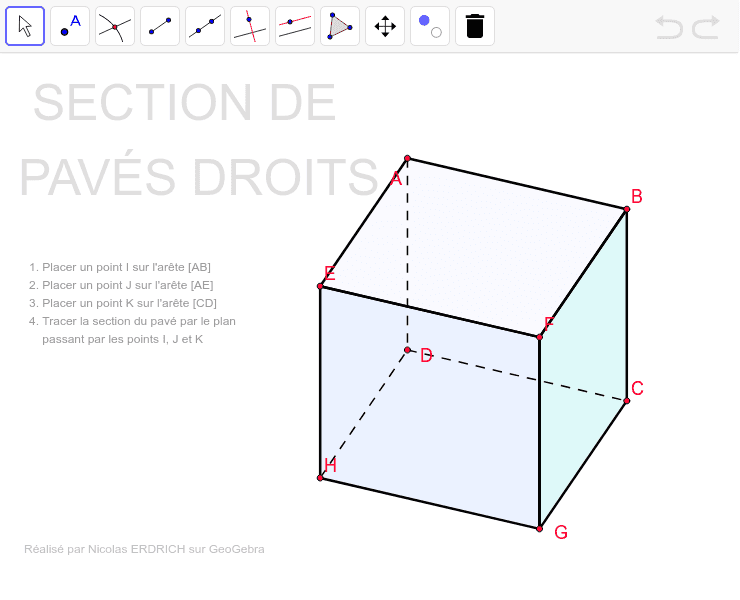
This example demonstrates how to dynamically interact with and visualize the cross-sectional shapes of a cube from various angles. Key math concepts include solid geometry, geometric construction, spatial visualization, and inequality representation. Construction highlights from the summary involve commands like Circle, PointIn, Sequence, Element, Polygon, Segment, Corner, Line, and Intersect, along with objects such as L, K_1, c, O, P, α, R_x, β, R_y, γ, R_z, Mat, longueur, largeur, profondeur, cube, cube', Copyright, AE, droite_1, listepoints, C, AB, avant_1, AC, dessus_1, D, H, G, dessus, s_{DHdessus}, s_{HGdessus}, s_{GCdessus}, s_{CDdessus}, A, E, arrière, s_{DAarrière}. Suitable for high school solid geometry instruction to enhance understanding and exploration of three-dimensional shape cross-sections.
GeoGebra Commands & Parameters
Circle(K_1, L) → cPointIn(c) → PSequence(Mat * Element[cube, k], k, 1, 8) → cube'Element(Element[AE, 3], 1) → droite_1Sequence(O + (Element[cube', k, 1, 1], Element[cube', k, 2, 1]), k, 1, 8) → listepointsElement(listepoints, 3) → CElement(AB, 3, 1) → avant_1Element(AC, 3, 1) → dessus_1Element(listepoints, 4) → DElement(listepoints, 8) → HElement(listepoints, 7) → GPolygon(D, H, G, C) → dessus, s_{DHdessus}, s_{HGdessus}, s_{GCdessus}, s_{CDdessus}Element(listepoints, 1) → AElement(listepoints, 5) → EPolygon(D, A, E, H) → arrière, s_{DAarrière}, s_{EAarrière}, s_{EHarrière}, s_{HDarrière}Element(listepoints, 6) → FPolygon(H, G, F, E) → droite, s_{HGdroite}, s_{GFdroite}, s_{EFdroite}, s_{EHdroite}Element(listepoints, 2) → BPolygon(D, C, B, A) → gauche, s_{CDgauche}, s_{BCgauche}, s_{BAgauche}, s_{ADgauche}Polygon(F, B, C, G) → avant, s_{FBav}, s_{BCavant}, s_{CGavant}, s_{GFavant}Polygon(B, F, E, A) → dessous, s_{BFdessous}, s_{FEdessous}, s_{EAdessous}, s_{ABdessous}Segment(B, A) → p_{AB}Segment(D, C) → p_{DC}Segment(H, G) → p_{HG}Segment(G, F) → p_{GF}Segment(A, D) → p_{AD}Segment(E, H) → p_{HE}Segment(F, E) → p_{FE}Segment(A, E) → p_{EA}Segment(F, B) → p_{FB}Segment(H, D) → p_{HD}Segment(E, H) → p_{EH}Segment(C, G) → p_{CG}Segment(C, B) → p_{CB3}Segment(A, E) → p_{AE}Segment(C, B) → p_{CB}Corner(1) → coin1'Point(s_{BAgauche}) → IPoint(s_{EAarrière}) → JPoint(s_{CDgauche}) → KSegment(I, K) → aSegment(I, J) → bLine(K, b) → dIntersect(d, s_{HDarrière}) → O_1Segment(J, O_1) → eIntersect(d, p_{HG}) → QSegment(J, Q) → fPolygon(I, J, Q, K) → poly1, j, m, q, nPolygon(I, J, O_1, K) → poly2, j_1, m_1, o, n_1Polygon(I, E, Q, K) → poly3, i, e_1, q_1, kPolygon(B, A, D, C) → poly4, b_1, a_1, d_1, c_1
AI Drawing Prompt Reference
Draw a cube and show its cross-sectional shapes from different angles. First, draw a cube, then create multiple sections by selecting the cube's vertices and faces, including front, back, top, bottom, left, right, and diagonal sections. Finally, connect the vertices of these sections to form multiple polygons, demonstrating the cube's shape in different sections.
The prompt above was compiled from the original drawing commands and is for reference only.