
Cross Section of a Sphere by Claude Blanc
Loading the math board and drawing, please wait…
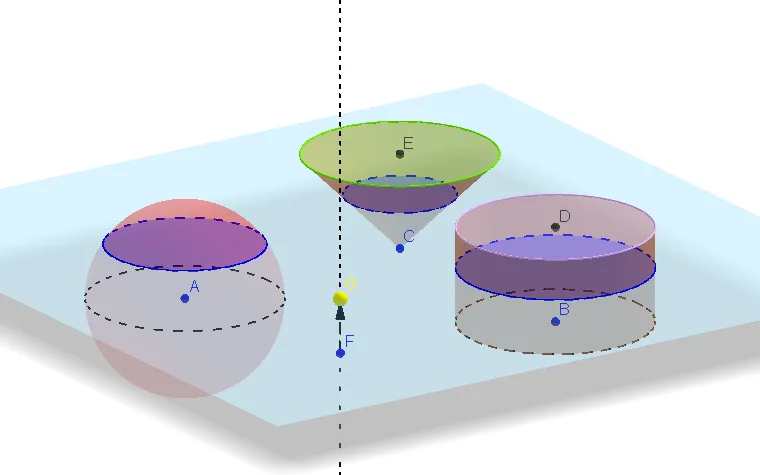
This example demonstrates the cross sections of a sphere, cone, and cylinder. By adjusting parameters, you can observe how the cross sections change. Key mathematical concepts include solid geometry and coordinate geometry. The example uses commands such as OrthogonalLine, Circle, Vector, Translate, Sphere, Cylinder, Point, OrthogonalPlane, IntersectPath, and Cone in GeoGebra.
GeoGebra Commands & Parameters
OrthogonalLine(A, xOyPlane) → aCircle(A, 2, a) → cVector(A, B) → uTranslate(c, u) → c'Sphere(A, 2) → bCylinder(B, D, 2) → d, e, f, gOrthogonalLine(F, xOyPlane) → jPoint(j) → GOrthogonalPlane(G, j) → lIntersectPath(l, b) → qIntersectPath(l, d) → rVector(A, E) → vTranslate(c, v) → c'_1Cone(E, C, 2) → h, k, iIntersectPath(l, h) → pCorner(p)Vector(F, G) → w
AI Drawing Prompt Reference
Draw a 3D solid geometry scene: place a point on a horizontal base plane as the center of a sphere, draw a sphere of radius 2, and draw a vertical line through the center. Use this line as the axis to draw a circle of radius 2, then translate this circle horizontally to form the base circle of a cylinder. Near the sphere center, take another point as the apex of a cone, and draw a cone with base radius 2 and height 2, using the line from the apex to the base center as its axis. Then, in space, draw a vertical line and pick a point on it; through this point, construct a plane perpendicular to this line. This plane intersects the sphere, cylinder, and cone, producing their cross-section curves (circles or ellipses). Finally, draw a vector from one point on the vertical line to another point to indicate the direction of section movement.
The prompt above was compiled from the original drawing commands and is for reference only.