
Cosine Values and Nested Triangles
Loading the math board and drawing, please wait…
In collections
Trigonometry: Basic and More
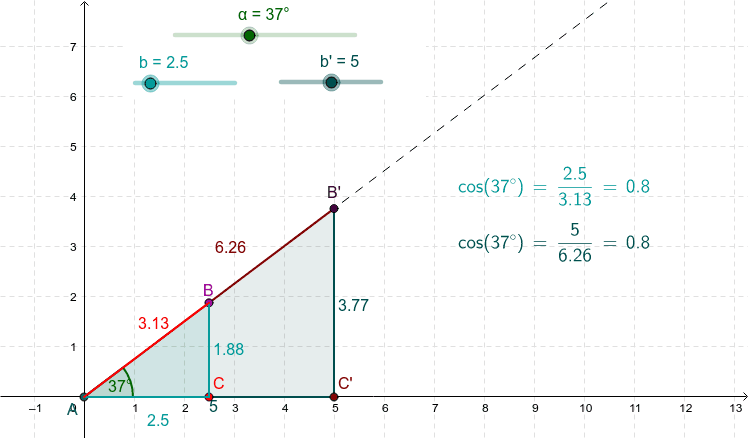
This example demonstrates the well-defined nature of the cosine function using nested (similar) triangles. It involves core concepts like the definition of cosine, properties of similar triangles, and geometric constructions. GeoGebra commands used include Point, Intersect, Rotate, Angle, Ray, OrthogonalLine, and Polygon. Suitable for high school mathematics education to understand the geometric definition and properties of trigonometric functions.
GeoGebra Commands & Parameters
Point(xAxis) → ZIntersect(xAxis, yAxis) → ARotate(Z, α, A) → Z'Angle(Z, A, Z') → βRay(A, Z') → zOrthogonalLine(C, xAxis) → b_3Intersect(b_3, z) → BOrthogonalLine(C', xAxis) → a'_1Intersect(a'_1, z) → B'Polygon(A, C, B) → poly1, b_1, a, cPolygon(A, C', B') → poly2, b'_1, a', c'
AI Drawing Prompt Reference
On a coordinate plane, start with a point on the horizontal axis from the origin. Rotate this point around the origin by an angle to create a new ray. From two distinct points on the horizontal axis, draw perpendicular lines upward; these intersect the rotated ray, forming two similar triangles. Construct nested triangles using the origin, the foot points, and the intersections. Mark the rotation angle. The figure illustrates the geometric definition of cosine through similar triangles, emphasizing the ratio of adjacent side to hypotenuse.
The prompt above was compiled from the original drawing commands and is for reference only.