
Cosine Theorem Proof
Loading the math board and drawing, please wait…
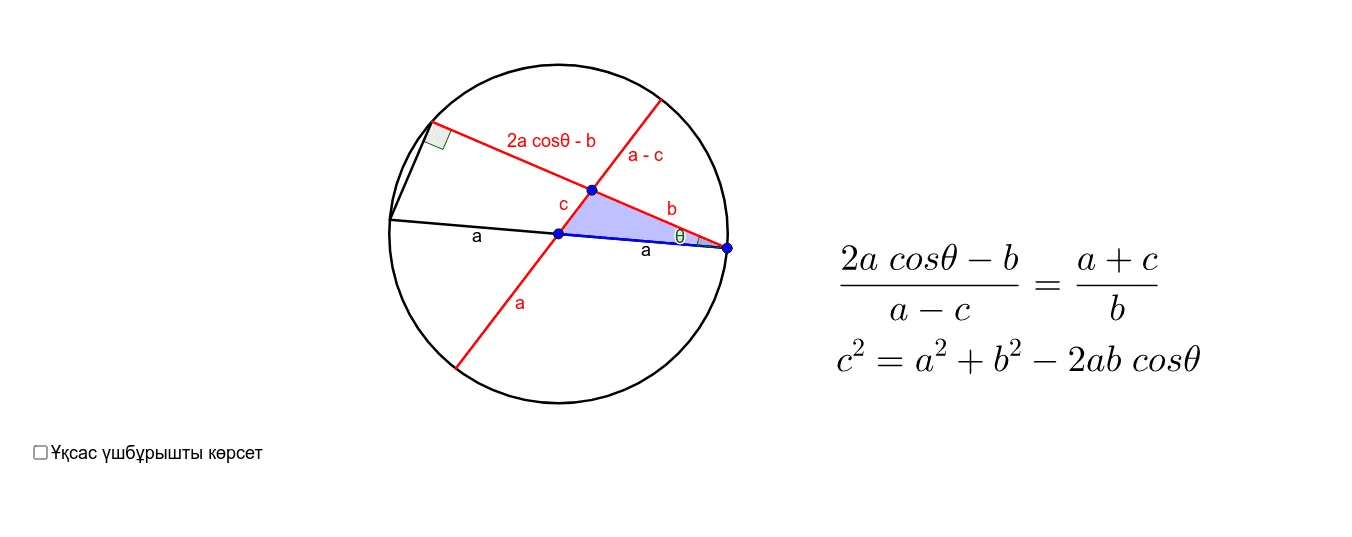
This example demonstrates the application of the Cosine Theorem in triangles, dynamically showing the relationship between side lengths and angles. Core mathematical concepts include the Cosine Theorem, triangle geometry, vectors, and analytical geometry. Construction highlights involve using GeoGebra commands like Ray, Circle, Intersect, Segment, Line, Angle, and Polygon to build triangles and auxiliary shapes. Suitable for high school mathematics teaching and student-led exploration of geometric theorem proofs, aiding in understanding the integration of spatial geometry and algebraic methods.
GeoGebra Commands & Parameters
Ray(C, B) → aRay(C, A) → bCircle(B, C) → cIntersect(c, b, 2) → DIntersect(c, a, 2) → ESegment(E, D) → dLine(A, B) → eIntersect(c, e, 1) → FIntersect(c, e, 2) → GAngle(E, D, C) → αSegment(D, A) → fSegment(A, C) → gSegment(E, B) → hSegment(B, C) → iSegment(G, B) → jSegment(B, A) → kSegment(A, F) → lPolygon(A, B, C) → poly1, c_1, a_1, b_1Polygon(D, G, A) → poly2, a_2, d_1, g_1Polygon(A, F, C) → poly3, c_2, a_3, f_1Angle(A, C, B) → β
AI Drawing Prompt Reference
Draw a triangle with three vertices. From two vertices, draw rays toward the third vertex. Using one vertex as the center, draw a circle with radius equal to the distance to another vertex. The circle intersects the two rays at two points; connect these points with a segment. Then draw a line through the other two vertices, intersecting the circle at two points. Select several points on the circle and connect them to the triangle vertices to form auxiliary triangles. Mark two key angles. This illustrates the geometric proof of the cosine theorem.
The prompt above was compiled from the original drawing commands and is for reference only.