
Corresponding Parts and Scale Factors
Loading the math board and drawing, please wait…
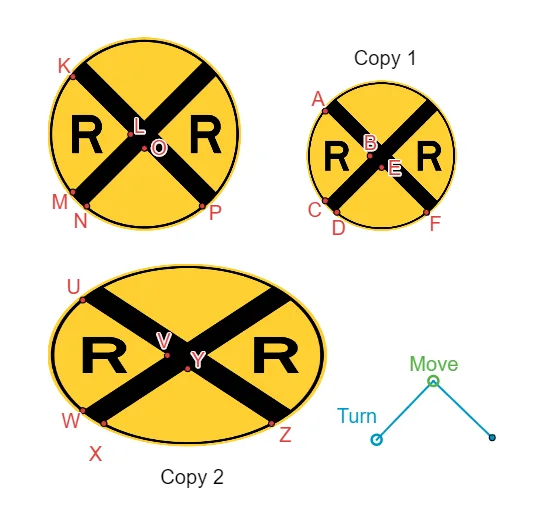
This example demonstrates the concept of corresponding parts and scale factors. Key mathematical concepts include similar figures and proportional relationships. Using GeoGebra commands such as Segment, Midpoint, Dilate, etc., similar figures are constructed and the changes in corresponding parts and scale factors are observed. Suitable for students in middle school and above to learn about similar figures.
GeoGebra Commands & Parameters
Segment(I, U_2) → h_1Midpoint(h_1) → W_1Segment(I, G) → i_1Midpoint(i_1) → Z_1AngularBisector(B_1, A_2, C_1) → fAngularBisector(A_2, B_1, J) → gIntersect(f, g) → K_1Point(yAxis) → L_2Circle(A_2, L_2) → cLine(L_2, f) → hMirror(h, f) → h'Circle(C_1, Radius[c]) → dIntersect(d, yAxis, 1) → M_1Line(M_1, g) → iCircle(K_1, 9) → ePoint(h) → N_1Circle(K_1, N_1) → kIntersect(k, h, 2) → MIntersect(h, i) → LIntersect(k, i, 2) → KIntersect(k, h', 1) → NIntersect(h', i) → OIntersect(k, i, 1) → PCircle(L_1, 7.58) → pPoint(p) → U_1Segment(U_1, L_1) → jOrthogonalLine(L_1, j) → lIntersect(p, l, 1) → V_1Segment(V_1, L_1) → mAngularBisector(E_1, D_1, F_1) → nAngularBisector(Q, E_1, D_1) → qIntersect(n, q) → RPoint(r) → SCircle(R, S) → tIntersect(t, s, 1) → BIntersect(t, r, 2) → EPoint(q) → V_2Circle(R, V_2) → c_1Line(B, q) → aOrthogonalLine(B, a) → bIntersect(c_1, b, 2) → CIntersect(c_1, a, 1) → FIntersect(c_1, a, 2) → ASegment(F_1, Q) → f_1Segment(D_1, F_1) → g_1Segment(A_2, C_1) → j_1Segment(C_1, T) → k_1Dilate(Z_1, 0.145, A_1) → VDilate(V, -1, A_1) → Z''Dilate(W_1, 0.145, A_1) → W'Dilate(W', -1, A_1) → YLine(I, H) → l_1Line(G, U_2) → m_1Ellipse(H_1, G_1, W_2) → d_1Line(V, l_1) → n_1Line(V, m_1) → p_1Line(Y, m_1) → q_1Line(W', l_1) → r_1Intersect(d_1, p_1, 1) → WIntersect(d_1, n_1, 1) → UIntersect(d_1, q_1, 1) → XIntersect(d_1, n_1, 2) → ZLine(E, n) → s_1Intersect(c_1, s_1) → D, J_1Angle(U_1, L_1, V_1) → α
AI Drawing Prompt Reference
Construct a geometric figure demonstrating similar triangles and scale factors. Begin with a triangle and draw two angle bisectors, intersecting at the incenter. Use this point as the center of a circle that intersects the bisectors, creating a set of corresponding points. Then construct a second triangle, similarly draw its angle bisectors and find their intersection, use this as the center of another circle, and determine corresponding vertices via intersections with lines. Finally, apply a dilation to connect corresponding parts of the two figures, illustrating proportional relationships.
The prompt above was compiled from the original drawing commands and is for reference only.