
Coordinates Game: Boat Position with Sliders
Loading the math board and drawing, please wait…
In collections
Games
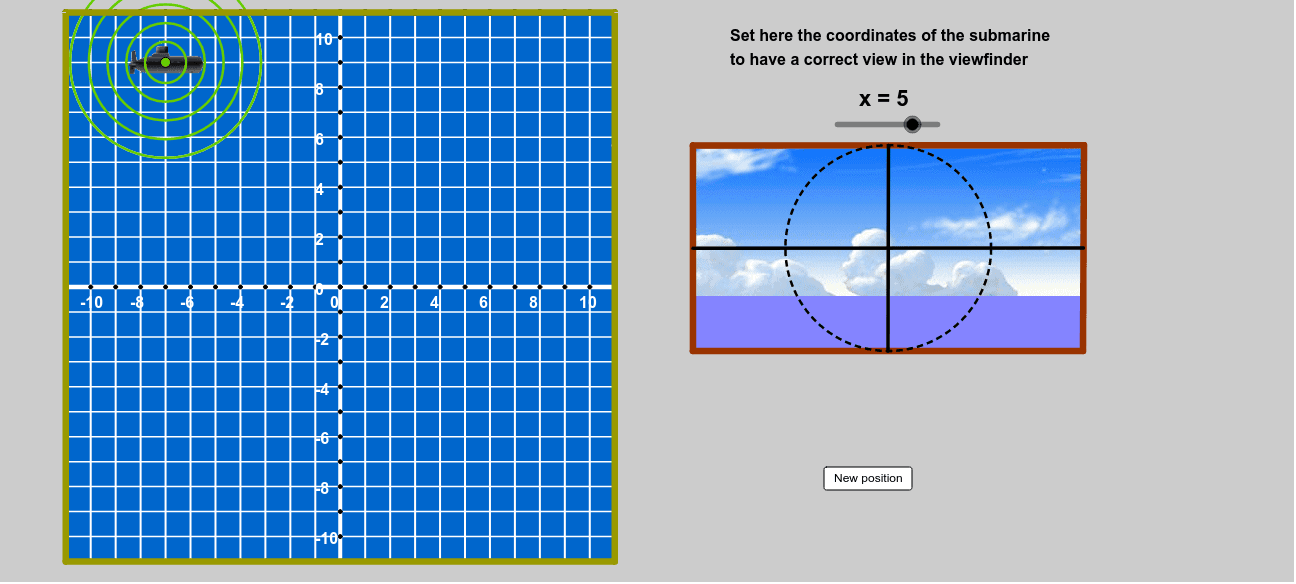
This GeoGebra example demonstrates an interactive coordinate game in which users move a boat or target point by adjusting x and y sliders and receive immediate feedback when the coordinates are correct. It highlights plane coordinate systems, point coordinates, parameter control, conditional logic, random target generation, and geometric construction. The construction uses Random to create targets, Point to place the boat and target, sliders for xA and yA, If to test coordinate matches, Sequence to generate lists or repeated objects, and commands such as Circle, Ray, OrthogonalLine, Intersect, Midpoint, Segment, Polygon, Line, Rotate, and Mod to build auxiliary lines, boat shapes, symmetry or rotation effects, and coordinate relationships. It is suitable for middle-school or high-school mathematics lessons on coordinate geometry, interactive practice, and GeoGebra construction.
GeoGebra Commands & Parameters
Random(-10, 10) → bbRandom(-10, 10) → aaRandom(-10, 10) → ccRandom(4, 15) → rrCircle(A, (1.5 * v - 1) * rr) → c'Ray(A, (0, 0)) → aOrthogonalLine(A, a) → bIntersect(c', b) → B, CIntersect(c', a) → D, TCircumcircleArc(B, D, C) → dMidpoint(C, D) → EMidpoint(B, D) → F_2Ray(A', E) → eRay(A', F_2) → fIntersect(d, e) → G,Intersect(d, f) → H,CircumcircleArc(G, D, H) → gCircle(I, 1) → hSequence(Text[If[s < 10, " ", ""] + (s), (21.6 + 2 * Mod[s - 1, 3], 7.75 - 2 * Div[s - 1, 3])], s, 1, 12) → liste3Circle(J, 1) → kSequence(Text[If[s ≟ 1, " ", If[s < 5, " ", ""]] + (30 * (s - 1)) + "º", (21.25 + 2 * Mod[s - 1, 3], -6.25 - 2 * Div[s - 1, 3])], s, 1, 12) → liste4If(yB > -5, 5*°, (((xB - 3 * yB) / 2 - 19 - 1) * 30)°) → angIf(ang ≟ α ∧ dist ≟ rr, true, false) → razSegment(O, N) → mCircle(A, (2 * v - 1) * rr - n) → pSequence(Circle[A, (1.5 * v - 1) * rr - i], i, 0, n, n / 10) → liste5Polygon(P, Q, R, S) → poly1, p_1, q, r_1, sCircle((0, 0), If[2 * v * rr > 12, 0, 2 * v * rr]) → cMidpoint(K, L) → UMidpoint(U, L) → VMidpoint(U, V) → WMidpoint(V, L) → ZSegment(K, C_1) → lLine(A, l) → iSegment(A, U) → tIntersect(c, t) → A_1, B_1Segment(U, A_1) → a_1Rotate(C_1, 6 * v, U) → L'Segment(U, L') → b_1Mod(v * 100, 2) → abSegment(O, D_1) → jCircle(O, C_1) → g_1Point(g_1) → E_1Segment(O, E_1) → h_1Circle(F_1, 6.5 - abs(r / 4.5)) → q_1Line(F_1, l) → i_1Intersect(q_1, i_1) → G_1, H_1Line(J_1, r_1) → j_1Point(j_1) → N_1Line(N_1, l) → l_1Line(J_1, l) → m_1Point(m_1) → O_1Point(l_1) → P_1Intersect(l_1, r_1) → M_1Polygon(M_1, N_1, J_1, F) → poly2, m_2, n_1, j_2, f_2Point(l_1) → Q_1Point(m_1) → R_1Polygon(P_1, Q_1, R_1, O_1) → poly3, p_2, q_2, r_2, o_1Point(j_1) → S_1Polygon(S_1, T_1, O_1, J_1) → poly4, s_1, t_1, o_2, j_3Midpoint(s_1) → V_1Midpoint(o_2) → W_1Midpoint(S_1, J_1) → Z_1Midpoint(t_1) → A_2Segment(V_1, W_1) → a_2Segment(Z_1, A_2) → b_2Intersect(b_2, a_2) → B_2Circle(B_2, V_1) → c_2Sequence((x(O) + i, y(D_1)), i, -11, 11, 1) → liste1Sequence((x(N) + i, y(N)), i, -11, 11, 1) → liste6Sequence((x(C_1), y(C_1) + i), i, -11, 11, 1) → liste7Sequence((x(E_1), y(E_1) + i), i, -11, 11, 1) → liste8Ray(M_1, T_1) → c_1Sequence(Segment[Element[liste8, i], Element[liste7, i]], i, 0, 22) → liste10Sequence((x(D_1) + i, 0), i, -11, 11) → liste2Sequence(Segment[Element[liste1, i], Element[liste6, i]], i, 0, 22) → liste9Line(S, P) → d_1Line(J_1, S_1) → e_1Line(Q_1, e_1) → f_1Intersect(d_1, s) → MIntersect(d_1, f_1) → C_2Line(R, d_1) → k_1Intersect(e_1, k_1) → D_2Polygon(S, C_2, Q_1, S_1, D_2, R) → poly5, s_2, c_3, q_3, s_3, d_2, r_3Point(d_1) → E_2Line(E_2, p_1) → e_2Intersect(k_1, e_2) → G_2Polygon(E_2, P, Q, G_2) → poly6, e_3, p_3, q_4, g_2Sequence(O + (i, 0), i, -10, 10) → liste11Sequence(O + (0, i), i, -10, 10) → liste12Sequence(i, i, -10, 10) → liste13Sequence(Text[Element[liste13, i], (x(Element[liste11, i] - 0.42), y(Element[liste11, i] - 0.85))], i, 1, Length[liste13], 2) → liste14Sequence(Text[Element[liste13, i], (x(Element[liste12, i] - 1), y(Element[liste12, i] - 0.31))], i, 1, Length[liste13], 2) → liste15
AI Drawing Prompt Reference
Create an interactive coordinate game with a randomly generated target point and a movable boat, controlled by sliders for the boat's coordinates. Provide immediate feedback when the boat's coordinates match the target. Show a plane coordinate system, with points for the boat and target, sliders for boat movement, conditional logic for coordinate matching, and geometric constructions including circles, rays, orthogonal lines, segments, and symmetry or rotation effects.
The prompt above was compiled from the original drawing commands and is for reference only.