
Continuity for Bezier Curves
Loading the math board and drawing, please wait…
In collections
Mathematics of Computer Graphics
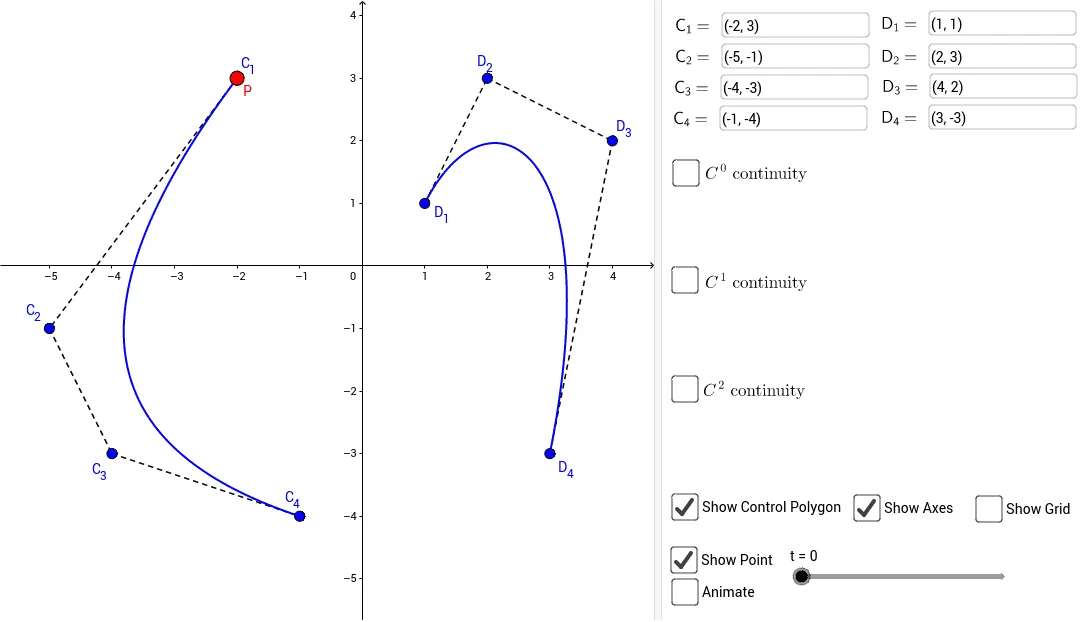
This interactive GeoGebra construction explores the continuity (C0, C1, etc.) of Bezier curves at their joining points. It demonstrates how the positions of control points and tangent vectors affect the smoothness of curve connections. Core concepts include parametric curves, control polygons, tangent vector continuity, and conditions for geometric smoothness. The construction uses Locus to trace curve paths, Segment and Vector to build control polygons and tangents, If for conditional continuity checks, and multiple InputBoxes and sliders (t1, a) to dynamically adjust control points. Suitable for high school to university courses in mathematics or computer graphics, this example helps visualize the geometric conditions for smooth Bezier curve splicing.
GeoGebra Commands & Parameters
Locus(P, t1) → loc1Textfield(C_1) → InputBox1Textfield(C_2) → InputBox2Textfield(C_3) → InputBox3Textfield(C_4) → InputBox4Segment(C_1, C_2) → fSegment(C_2, C_3) → gSegment(C_3, C_4) → hLocus(Q, s) → loc2Segment(D_1, D_2) → iSegment(D_2, D_3) → jSegment(D_3, D_4) → kTextfield(D_1) → InputBox5Textfield(D_2) → InputBox6Textfield(D_3) → InputBox7Textfield(D_4) → InputBox8Vector(D_3, D5) → uVector(C_2, C5) → vVector(C_3, C_4) → C3C4Vector(D_1, D_2) → D1D2If(t ≤ 1, ((1 - t)^(3) * C_1) + (((3 * t) * (1 - t)^(2)) * C_2) + (((3 * t^(2)) * (1 - t)) * C_3) + (t^(3) * C_4), ((2 - t)^(3) * D_1) + (((3 * (t - 1)) * (2 - t)^(2)) * D_2) + (((3 * (t - 1)^(2)) * (2 - t)) * D_3) + ((t - 1)^(3) * D_4)) → R
AI Drawing Prompt Reference
Draw the continuity of Bezier curves with four control points C1, C2, C3, C4 and four auxiliary points D1, D2, D3, D4. Create four line segments connecting the control points and auxiliary points, then use the Locus command to trace the curve paths. Adjust the parameters t1 and s in the input boxes to observe how the continuity of the curve changes at the connection points. Pay attention to how the positions of control points and auxiliary points, as well as the tangent vectors, affect the smoothness of the curve.
The prompt above was compiled from the original drawing commands and is for reference only.