
Construction Techniques 4: Parallel and Perpendicular Lines Practice (IM Geo 1.6
Loading the math board and drawing, please wait…
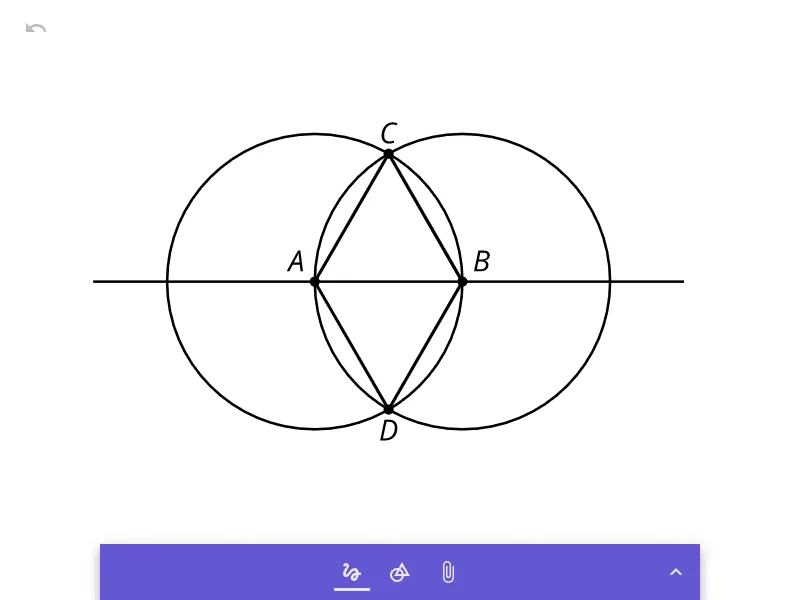
① This example demonstrates a practice exercise for constructing parallel and perpendicular lines using geometric construction techniques in GeoGebra, aligned with IM Geometry Unit 1.6. ② Core mathematical concepts include parallelism, perpendicularity, perpendicular bisectors, and the principles of compass-and-straightedge construction, involving relationships among points, lines, and circles. ③ Construction highlights: from the summary, objects a, b, and pic1 are used; a and b likely represent lines or segments, while pic1 is an inserted image for context. Typical construction steps involve using circle and intersection commands to create equidistant points and determine the required directions. ④ This is suitable for middle or high school geometry students learning construction techniques, reinforcing theorems about parallel and perpendicular lines, and can be used for classroom practice, homework, or teacher demonstrations to visualize geometric logic.
GeoGebra Commands & Parameters
Inlinetext aInlinetext b
AI Drawing Prompt Reference
Draw two parallel lines and a line perpendicular to both. Start by creating equidistant points using circles and intersections, then construct the parallel lines. Next, find the perpendicular bisector of these parallel lines, and finally, draw the perpendicular line through the intersection of the bisector and the parallel lines.
The prompt above was compiled from the original drawing commands and is for reference only.