
Construction of a Rhombus by kkincaid
Loading the math board and drawing, please wait…
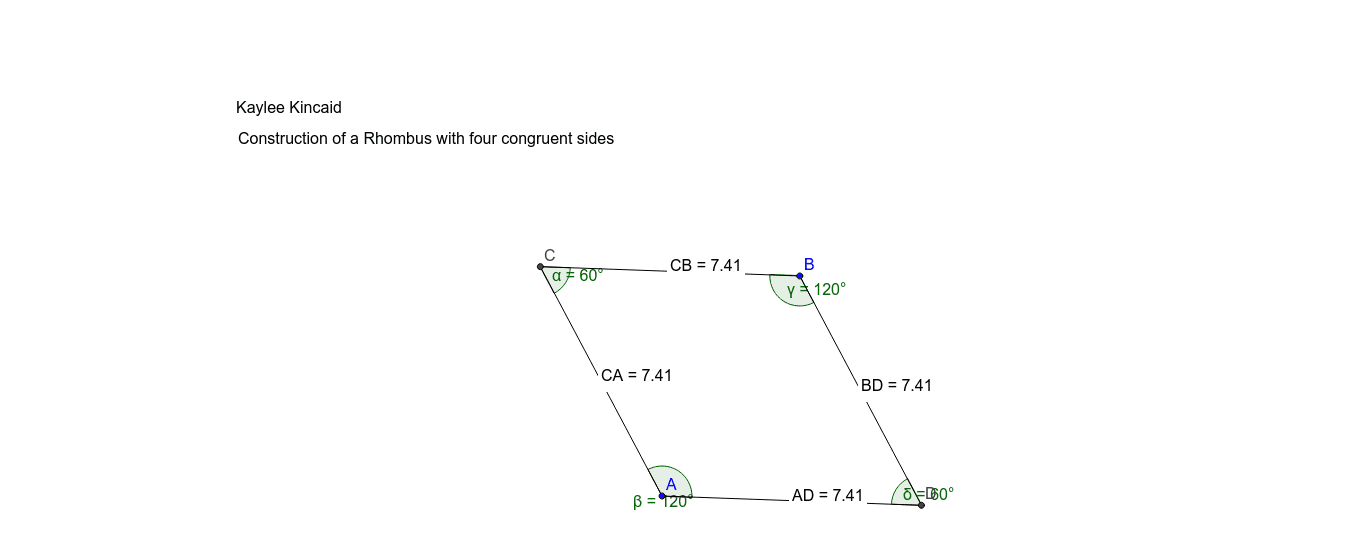
This example demonstrates how to construct a rhombus using geometric methods. Key math concepts involved include circles, intersections, segments, distances, midpoints, and angles. The construction utilizes GeoGebra commands such as Circle, Intersect, Segment, Distance, Midpoint, and Angle. It is suitable for middle school students and above learning geometric constructions, as well as for mathematical teaching demonstrations.
GeoGebra Commands & Parameters
Circle(A, B) → cCircle(B, A) → dIntersect(c, d, 1) → CSegment(A, C) → aSegment(B, C) → bIntersect(c, d, 2) → DSegment(B, D) → eSegment(A, D) → fDistance(C, B) → distanceCBMidpoint(C, B) →Distance(A, D) → distanceADMidpoint(A, D) →Distance(C, A) → distanceCAMidpoint(C, A) →Distance(B, D) → distanceBDMidpoint(B, D) →Angle(A, C, B) → αAngle(D, A, C) → βAngle(C, B, D) → γAngle(B, D, A) → δ
AI Drawing Prompt Reference
Draw a rhombus. The rhombus is formed by two intersecting circles with centers at A and B. The intersection points C and D are the vertices of the rhombus. Draw line segments from A to C and B to C, and from B to D and A to D. The diagonals AC and BD intersect at their midpoint. The sides of the rhombus are equal in length, and the angles are determined by the intersection points. Ensure the rhombus is symmetric and clear.
The prompt above was compiled from the original drawing commands and is for reference only.