
Construction of a Cube
Loading the math board and drawing, please wait…
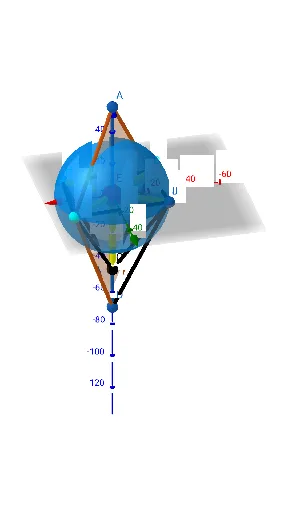
This example demonstrates the geometric construction of a cube. Key mathematical concepts include the properties of polyhedra in solid geometry, such as points, lines, and faces. Using GeoGebra commands like Point, Polygon, and Segment, the example constructs the various faces and edges of a cube. Suitable for high school geometry courses to help students understand basic concepts in solid geometry.
GeoGebra Commands & Parameters
Point(xAxis) → EPyramid(C, A, B, D, E) → a, faceABDC, edgeCE, edgeAE, edgeBE, edgeDE, faceACE, faceABE, faceBDE, faceCDE, edgeAC, edgeAB, edgeBD, edgeCDPoint(zAxis) → FSegment(F, C) → fSegment(F, E) → gSegment(F, B) → hPoint(zAxis) → GSegment(G, C) → iSegment(B, G) → jSegment(E, G) → kSegment(D, G) → lSegment(G, A) → mSegment(F, A) → nSegment(F, D) → pSegment(F, H) → rSegment(H, G) → qPolygon(A, G, D) → t1, d, a_1, g_1Polygon(H, G, D) → t2, d_1, h_1, g_2Segment(B, H) → sSegment(C, H) → tSegment(E, H) → bSegment(C, I) → ePoint(e) → JSegment(F, J) → f_1Segment(J, B) → i_1Segment(J, E) → k_1Midpoint(H, J) → KMidpoint(J, H) → LMidpoint(B, C) → MMidpoint(H, J) → NSphere(E, J) → oSegment(J, G) → cSegment(D, J) → j_1
AI Drawing Prompt Reference
Draw a cube in 3D space, starting with four vertices of the base square, then two points along the vertical axis for the top face. Connect all vertices to form twelve edges and six square faces. Then add auxiliary points inside or outside the cube, connecting them to cube vertices to create extra segments and triangular faces. Finally, construct a sphere centered at one cube vertex with radius equal to the distance to an auxiliary point, resulting in a solid geometry figure with construction lines.
The prompt above was compiled from the original drawing commands and is for reference only.