
Constructing Pi from the Geometry of Imaginary Unit i
Loading the math board and drawing, please wait…
In collections
Complex Math
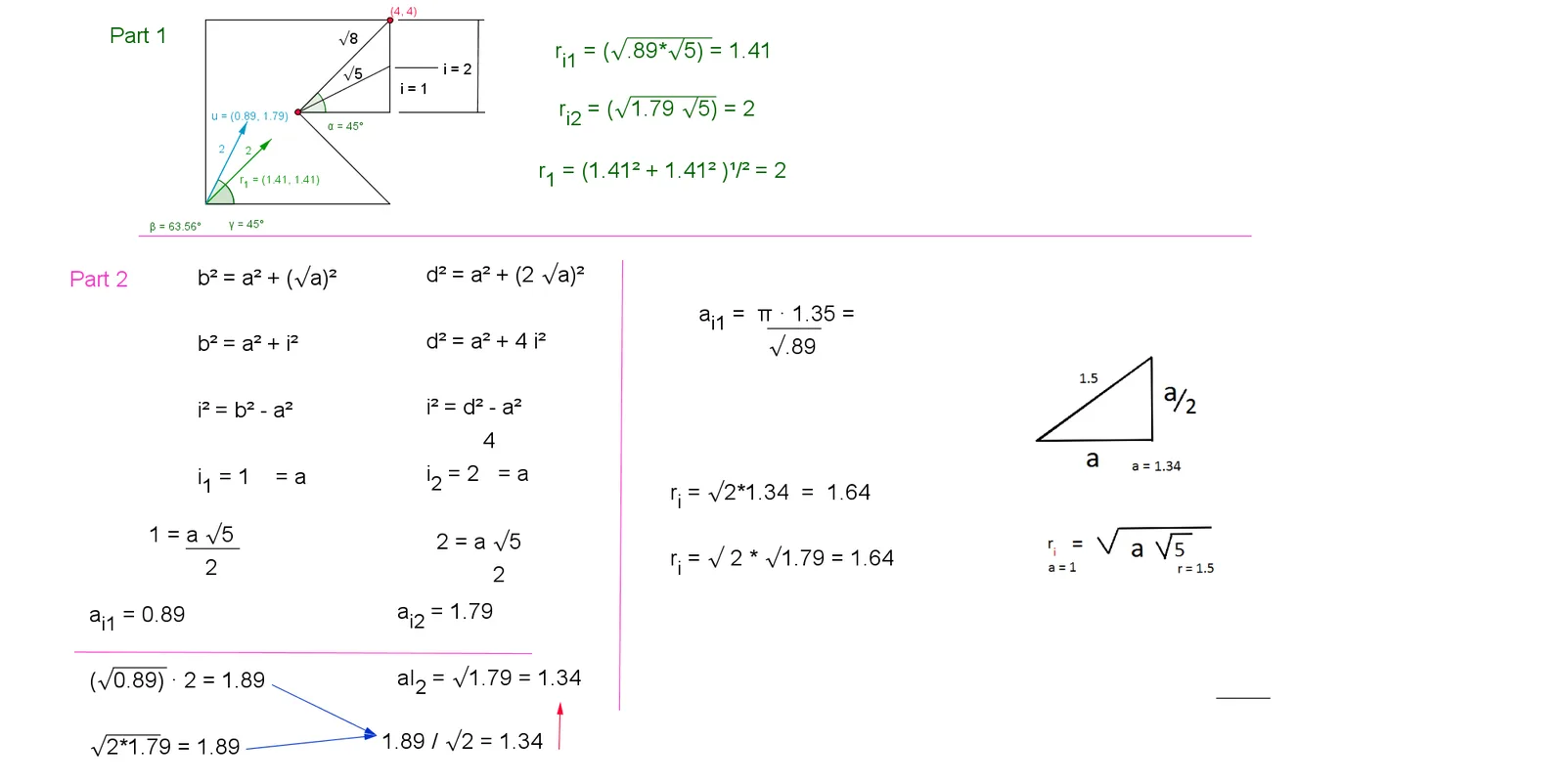
This GeoGebra example demonstrates a geometric construction that approximates the value of pi using the geometry of the imaginary unit i. It connects complex-number geometry with circle and angle relationships, including semicircles, chords, slopes, mirror symmetry, and polygonal constraints. The construction uses commands such as Semicircle, Circle, Segment, Polygon, Vector, Angle, Point, Distance, Intersect, Mirror, Textfield, and Slope, with labeled points A through L and objects such as i, r, alpha_u, beta_v, and Delta_v to define the figure. It is suitable for high school geometry, introductory college mathematics, or mathematical visualization activities focused on pi, complex numbers, and geometric construction.
GeoGebra Commands & Parameters
Semicircle(C, D) → cSemicircle(D, C) → dSegment(A, D) → aCircle(A, 1) → fSemicircle(E, F) → rSemicircle(F, E) → gPolygon(B, A, C, G) → poly1, b_1, a_1, c_1, g_1Vector((1.414213562373095, 1.414213562373095)) → u_3Vector((1.79, 0.89)) → vSegment(G, B) → eSegment(G, J) → hSegment(G, K) → iAngle(B, G, K) → α_uAngle(B, G, J) → β_vVector((0.89, 1.79)) → wSegment(G, L) → jAngle(B, G, L) → δ_wAngle(J, G, L) → Δ_vCircle(G, K) → kPoint(r) → NPoint(g) → MSegment(N, A) → pSegment(A, M) → qSegment(M, N) → sPolygon(N, C, G, B, M) → poly2, n_1, c_2, g_2, b_2, m_1Vector((2, 1)) → tVector((1, 2)) → uSegment(G, N) → d_1Segment(G, M) → e_1Angle(M, G, N) → α_tSegment(A, R) → k_1Segment(A, Q) → l_1Segment(Q, R) → p_1Circle(A, S) → q_1Distance(G, A) → distanceGAPoint(Circle[A, 3]) → TSegment(A, T) → r_1Point(Circle[G, 3]) → USegment(G, U) → s_1Point(Circle[T, 2.8284271247461903]) → VSegment(T, V) → t_1Distance(G, Q) → distanceGQDistance(G, M) → distanceGMSegment(G, M) → a_2Segment(W, Z) → d_2Vector(A_1, B_1) → u_2Vector(C_1, D_1) → v_2Distance(G, N) → distanceGNSegment(G, N) → f_2Distance(G, Q) → j_2Point(k) → E_1Point(k) → F_1Distance(F_1, E_1) → distanceF1E1Segment(E_1, F_1) → k_2Point(k_2) → G_1Point(s) → H_1Distance(G_1, H_1) → distanceG1H1Segment(G_1, H_1) → l_2Segment(I_1, J_1) → m_2Segment(K_1, L_1) → n_2Segment(K_2, L_2) → n_3Segment(K_3, L_3) → n_4Segment(K_4, L_4) → n_5Segment(K_5, L_5) → n_6Segment(K_8, L_8) → n_9Polygon(M_1, N_1, O_1, P_1) → poly3, m_3, n_{13}, o_2, p_2Intersect(k, q_1, 1) → Q_1Point(f_2) → R_1Circle(Q_1, R_1) → q_2Mirror(q_2, i) → r_2Segment(S_1, T_1) → a_3Segment(U_1, V_1) → b_3Intersect(f_3, i, 1) → W_1Point(f_3) → Z_1Segment(W_1, Z_1) → d_3Textfield(σ) → inputBox1Point(f_3) → C_2Point(f_3) → D_2Vector(G, D_2) → v_3Distance(G, D_2) → distanceGD2Vector(E_2, F_2) → w_3Mirror(N, p_1) → N'Mirror(A, p_1) → A'Segment(N', A') → p'Mirror(A, p_1) → A'_1Mirror(R, p_1) → R'Segment(A'_1, R') → g_3Mirror(A, p_1) → A'_2Mirror(M, p_1) → M'Segment(A'_2, M') → q'Mirror(A, p_1) → A'_3Mirror(Q, p_1) → Q'Segment(A'_3, Q') → h_3Segment(G, D_2) → i_3Slope(i_3) → m_4Point(p_3) → G_2Distance(G, G_2) → distanceGG2Vector(G, G_2) → j_3Segment(G, G_2) → l_3Angle(K, G, G_2) → αPoint(q_3) → H_2Point(s_3) → I_2Point(r_3) → J_2Polygon(H_2, I_2, J_2, G) → poly4, h_4, i_4, j_4, g_4Point(h_4) → M_2Point(j_4) → N_2Point(i_4) → O_2Point(g_4) → P_2Segment(O_2, M_2) → t_3Segment(N_2, P_2) → a_4Point(a_4) → Q_2Point(t_3) → R_2Segment(Q_2, R_2) → b_4Point(i_4) → T_2
AI Drawing Prompt Reference
Draw a geometric construction approximating pi using the imaginary unit i. Start with two intersecting semicircles, a unit circle, and a horizontal segment. Form a quadrilateral and add several vectors and segments from a central point to create multiple angles. Then draw a larger circle, place points on the semicircles, and connect them to form triangles. Add auxiliary circles and segments, measure distances from the center to various points, and place additional points to create more triangles and segments, illustrating angle and distance relationships.
The prompt above was compiled from the original drawing commands and is for reference only.