
Constructing an Ellipse Locus in GeoGebra
Loading the math board and drawing, please wait…
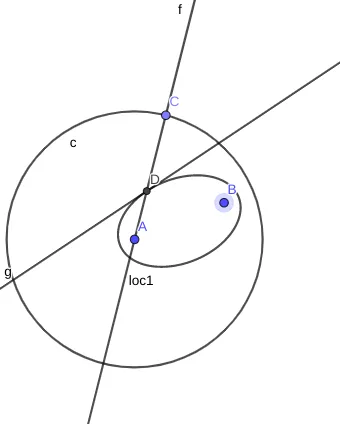
This GeoGebra example demonstrates how to construct an ellipse as a locus: the curve formed by points whose sum of distances to two fixed points remains constant. It centers on the definition of an ellipse in terms of a distance-sum invariant, along with the general concept of a locus (locus construction). The construction uses core geometry tools: Circle to build distance-related circles, Point to create and track key points, Line and LineBisector to form supporting geometric constructs, Intersect to compute intersection points that satisfy the required constraints, and Locus to trace the resulting locus curve (e.g., loc1). The activity is well suited for high school and early university learners studying coordinate geometry/analytic geometry and for classroom demonstrations of how geometric constraints generate recognizable conic sections via interactive graphing.
GeoGebra Commands & Parameters
Circle(A, 10) → cPoint(c) → CLine(A, C) → fLineBisector(C, B) → gIntersect(f, g) → DLocus(D, C) → loc1
AI Drawing Prompt Reference
Draw a locus curve defined by the ellipse distance-sum idea. Start with two fixed points A and B. Construct a circle centered at A with a given radius, then choose a point C on that circle. Create a line through A and C, and also construct the angle bisector line determined by C and B. Find their intersection point D. Finally, trace the locus by plotting how the intersection point D varies under the same constraints, producing a curve analogous to the ellipse formed by points whose distances to two fixed points have a constant sum, centered around the role of C and D.
The prompt above was compiled from the original drawing commands and is for reference only.