
Constructing a Rhombus with Euclidean Tools
Loading the math board and drawing, please wait…
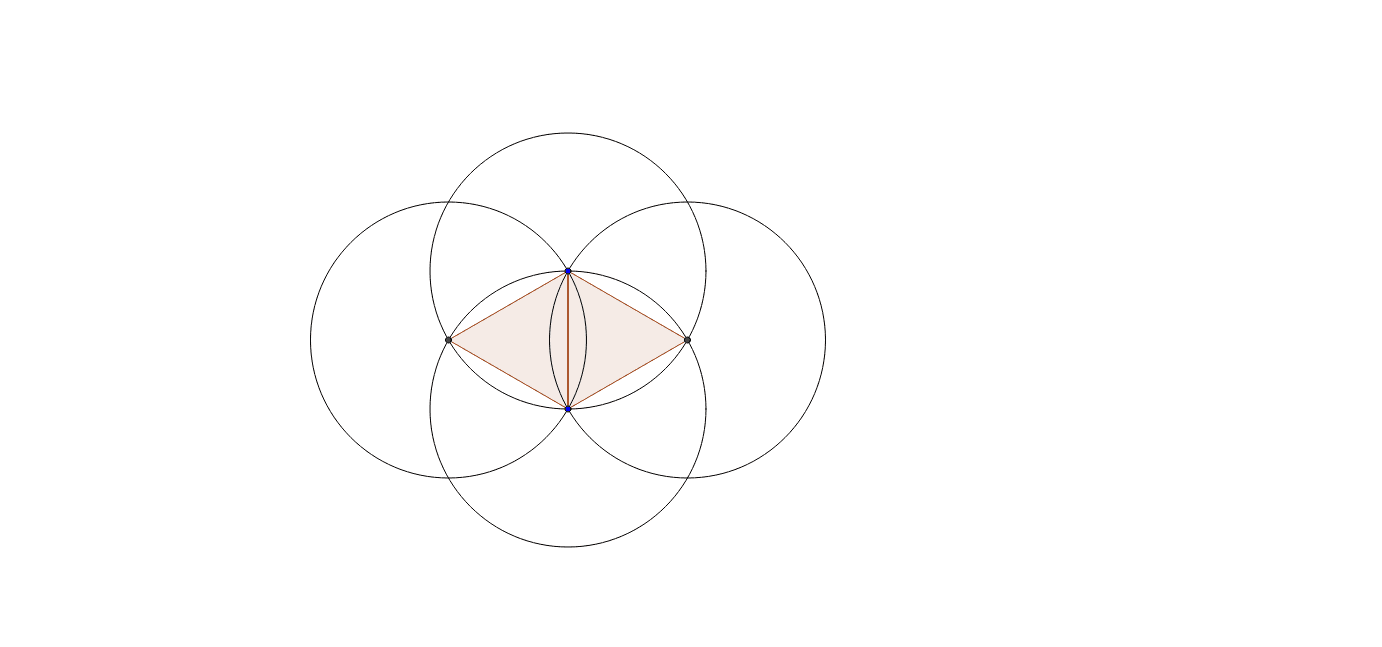
This example demonstrates the construction of a rhombus using Euclid's traditional approach with only a compass and straightedge. Key math concepts involved include geometric construction, polygon formation, and fundamental geometric principles. The construction utilizes GeoGebra commands such as Circle, Intersect, and Polygon to create points, determine intersections, and ultimately draw the rhombus. Suitable for middle school and above students learning geometric construction techniques and understanding the application of traditional geometric tools.
GeoGebra Commands & Parameters
Circle(A, B) → cCircle(B, A) → dIntersect(c, d, 1) → CIntersect(c, d, 2) → DCircle(C, A) → eCircle(D, A) → fPolygon(C, A, B) → poly1, b, c_1, aPolygon(A, D, B) → poly2, b_1, a_1, d_1
AI Drawing Prompt Reference
Construct a rhombus using classical straightedge-and-compass methods. Begin by placing two arbitrary points as endpoints of one side. Draw two circles centered at these points with radius equal to the distance between them; their intersections yield two additional points. Then draw two more circles centered at these intersection points, again using the original side length as radius. Finally, connect the original two points with one intersection to form a triangle, and connect them with the other intersection to form a second triangle; together these triangles outline the rhombus. The final figure shows two overlapping circles, two additional circles, and the rhombus formed by the four points.
The prompt above was compiled from the original drawing commands and is for reference only.