
Constructing a Rectangle by Renukatalwar
Loading the math board and drawing, please wait…
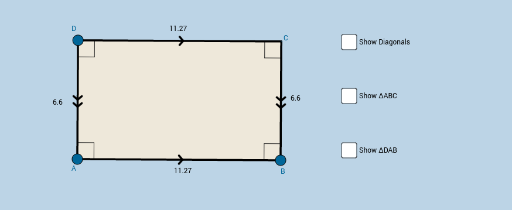
This example demonstrates how to construct a rectangle using GeoGebra. Key mathematical concepts include geometric construction, segments, angles, and polygons. Commands such as Segment, OrthogonalLine, Point, Intersect, Angle, Midpoint, and Polygon are used to build the rectangle. Suitable for middle school and above students learning geometric construction.
GeoGebra Commands & Parameters
Segment(A, B) → aOrthogonalLine(A, a) → bOrthogonalLine(B, a) → cPoint(b) → DOrthogonalLine(D, b) → dIntersect(c, d) → CSegment(D, A) → eSegment(D, C) → fSegment(C, B) → gAngle(C, B, A) → αAngle(B, A, D) → βAngle(A, D, C) → γAngle(D, C, B) → δMidpoint(D, B) → MSegment(D, M) → hSegment(M, B) → iSegment(A, M) → jSegment(M, C) → kAngle(B, A, M) → εAngle(M, B, A) → ζAngle(D, C, M) → ηAngle(M, D, C) → θAngle(A, D, M) → ιAngle(M, A, D) → κAngle(C, B, M) → λAngle(M, C, B) → μPolygon(A, B, C) → poly1, c_1, a_1, b_1Line(A, C) → nMirror(A, n) → A'Mirror(B, n) → B'Mirror(C, n) → C'Polygon(A', B', C') → poly_2, c', a', b'Polygon(D, A, B) → poly2, b_2, d_1, a_2Mirror(D, a_2) → D'Mirror(A, a_2) → A'_1Mirror(B, a_2) → B'_1Polygon(D', A'_1, B'_1) → poly2', b'_1, d', a'_1Polygon(A, B, C, D) → poly3, a_3, b_3, c_2, d_2Segment(A, C) → qSegment(D, B) → t
AI Drawing Prompt Reference
Draw a rectangle by first creating line segment AB, then drawing perpendicular lines from A and B to intersect at points D and C, and finally drawing line segments AD, DC, and CB to form rectangle ABCD.
The prompt above was compiled from the original drawing commands and is for reference only.