
Constructing a Parallelepiped by John Golden
Loading the math board and drawing, please wait…
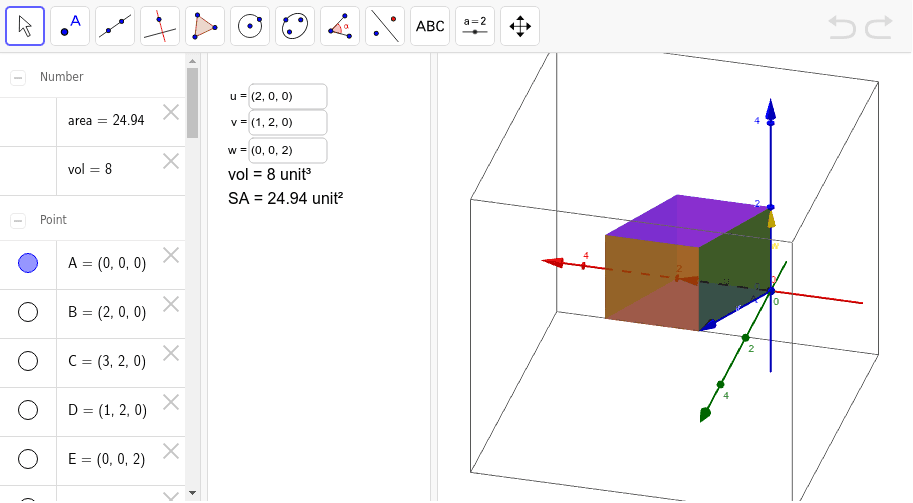
This example demonstrates how to construct a parallelepiped using GeoGebra. Key mathematical concepts include the cross product and dot product of vectors. By inputting vectors u, v, and w, the vertices and faces of the parallelepiped are generated. The commands used include TextField, Polygon, and inputBox. Suitable for high school and above students studying solid geometry.
GeoGebra Commands & Parameters
Textfield(u) → inputBox1Textfield(v) → inputBox2Textfield(w) → inputBox3Polygon(A, B, C, D) → poly1, a, b, c, dPolygon(A + w, B + w, C + w, D + w) → poly2, e, f, g, hPolygon(A, D, F, E) → poly3, a_1, d_1, f_1, e_1Polygon(A + u, D + u, F + u, E + u) → poly4, i, j, k, lPolygon(A, B, G, E) → poly5, a_2, b_1, g_1, e_2Polygon(A + v, B + v, G + v, E + v) → poly6, m, n, p, q
AI Drawing Prompt Reference
Draw a parallelepiped by inputting three vectors u, v, and w. Start by constructing the base face using u and v, then translate each vertex of the base along u, v, and w to get the other vertices of the parallelepiped, and connect these vertices to form all the faces of the shape.
The prompt above was compiled from the original drawing commands and is for reference only.