
Construct a Cylinder with Sliders and Discover Its Volume
Loading the math board and drawing, please wait…
In collections
Surface Area and Volume
Surface Area and Volume
Surface Area and Volume
Visual Geometry for Grade 9
Area, perimeter and volume of shapes
Area, Perimeter and Volume of shapes
Circumference, Area, and Volume
Surface Area and Volume of basic figures
Surface Area and Volume of basic figures
Surface Area and Volume of basic figures
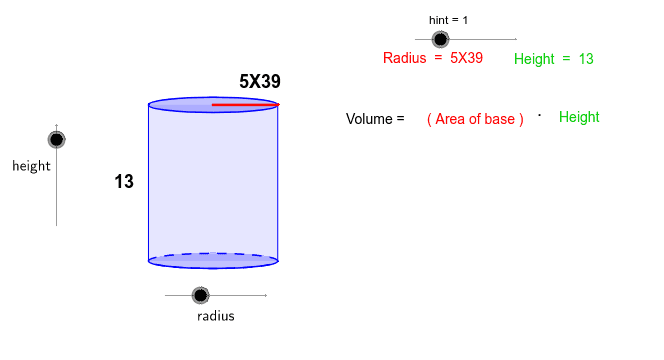
This example uses interactive sliders to let students dynamically construct a cylinder and explore how to calculate its volume. It covers the geometric properties of a cylinder, the relationship between base area and height, and the volume formula V = πr²h. Built with GeoGebra commands such as Intersect, Vector, Translate, Segment, Arc, Polygon, Root, Midpoint, and auxiliary objects (radius, control points), the cylinder is generated dynamically and the result is displayed in real time. Designed for high‑school and college students studying solid geometry and applied mathematics, it is ideal for classroom demos, problem solving, and independent inquiry.
GeoGebra Commands & Parameters
Intersect(c, xAxis, 1) → AIntersect(c, xAxis, 2) → BVector((-17, 0), (-1 * 17, b)) → uTranslate(c, u) → dTranslate(A, u) → CTranslate(B, u) → DSegment(A, C) → eSegment(B, D) → fArc(c, A, B) → gPolygon(C, D, B, A) → P, c_1, d_1, b_1, a_1Intersect(xAxis, yAxis) → ESegment(E, B) → hTranslate(E, u) → E'Translate(B, u) → B'Segment(E', B') → iRoot(32) → FMidpoint(i) → GMidpoint(e) → H
AI Drawing Prompt Reference
Draw a cylinder by adjusting the radius and height with sliders. Start by drawing a circle as the base, then create another base by translating the first one. Draw two parallel line segments as the side of the cylinder, and connect the two bases with arcs to form the side. Finally, use the sliders to dynamically adjust the cylinder's dimensions and observe the volume change.
The prompt above was compiled from the original drawing commands and is for reference only.