
Conic Sections Demo by mtzoumas
Loading the math board and drawing, please wait…
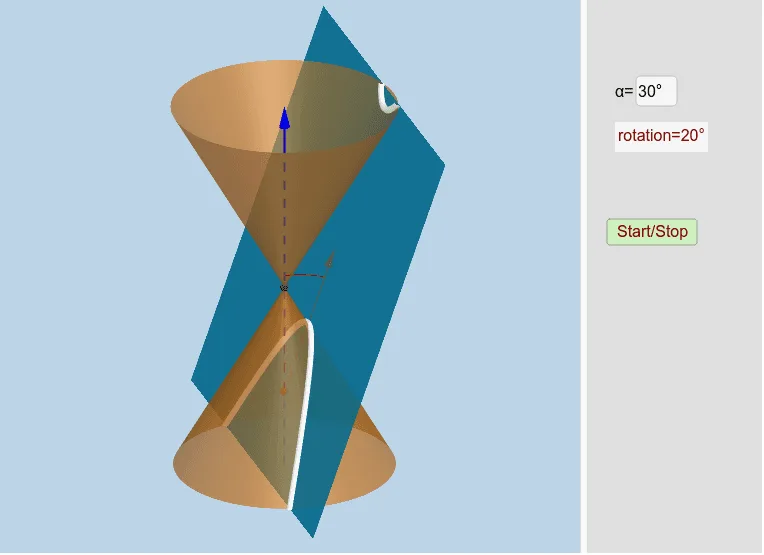
This example demonstrates the geometric phenomenon of conic sections formed by the intersection of a plane and a cone, including ellipses, parabolas, and hyperbolas. It involves core mathematical concepts such as conic sections, unit circle, polynomial functions, right triangles, derivatives, and equations. The construction utilizes GeoGebra commands like OrthogonalLine, Point, Line, Circle, Intersect, CircleArc, If, Plane, Mirror, InfiniteCone, IntersectPath, Vertex, Angle, Ray, Vector, and Textfield. It is suitable for high school and above students studying analytical geometry, solid geometry, and calculus.
GeoGebra Commands & Parameters
OrthogonalLine(M, xOyPlane) → aPoint(a) → BLine(A, yAxis) → gCircle(A, 16, xAxis) → cIntersect(g, c) → X_1, JIntersect(zAxis, c) → Z_1, Z_2CircleArc(A, X_1, Z_1) → fPoint(f) → CCIf(j < 0, A + (0, (16 * cos(0)), (16 * sin(0))), If[j < π / 2 - α - 0.01, A + (0, (16 * cos(j)), (16 * sin(j))), If[j < π / 2 - α + 0.1, A + (0, (16 * cos(π / 2 - α)), (16 * sin(π / 2 - α))), If[j < π / 2 + 0.1, A + (0, (16 * cos(j - 0.1)), (16 * sin(j - 0.1))), If[j > π / 2 + 0.1, A + (0, (16 * cos(π / 2)), (16 * sin(π / 2)))]]]]) → XXIf(anim, XX, CC) → CPoint(zAxis) → HIntersect(zAxis, xAxis) → OLine(C, A) → dLine(A, B) → bPlane(d, b) → eMirror(H, xOyPlane) → H'Point(zAxis) → IInfiniteCone(O, H, α) → mIntersectPath(e, m) → pVertex(p) → D, E, F, GAngle(C, A, Z_1) → βCircleArc(A, C, Z_1) → hCircle(A, 20, xAxis) → kRay(A, C) → iIntersect(i, k) → K,Vector(A, K) → lTextfield(α) → inputBox1
AI Drawing Prompt Reference
Draw a cone intersecting with a plane to form ellipses, parabolas, and hyperbolas, demonstrating conic sections. Include a unit circle, polynomial functions, right triangles, derivatives, and equations. Start by drawing a cone and a plane, then create arcs at intersection points, move points based on conditions, and finally draw the curves of the sections and auxiliary lines, labeling angles and vectors, and displaying parameter values.
The prompt above was compiled from the original drawing commands and is for reference only.