
Conic Sections 3: Dynamic Plane Cutting a Cone
Loading the math board and drawing, please wait…
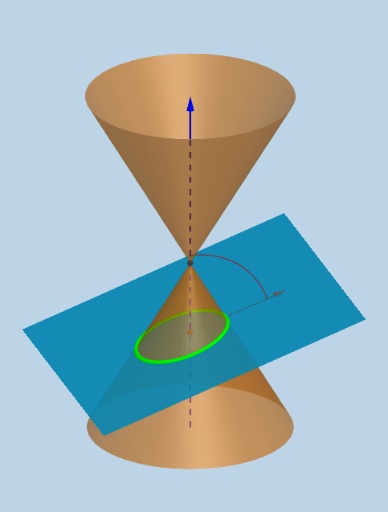
This GeoGebra example demonstrates how a dynamic plane cuts an infinite cone to generate various conic sections (circle, ellipse, parabola, hyperbola), visually revealing the geometric essence of conics as intersections of a plane with a cone. Core mathematical concepts include the definition of conic sections, the relationship between a plane and a cone, classification of section curves, and related geometric measurements such as perimeter and angles. Construction highlights: the InfiniteCone command creates the cone, Plane and IntersectPath generate the section curve, while OrthogonalLine, Point, Line, Circle, and Intersect build auxiliary geometric elements. Sliders and text fields allow dynamic parameter adjustment, and tools like Mirror, Vertex, Angle, Ray, and Vector enhance the visualization. Suitable for high school or early college students studying analytic geometry and solid geometry, and for teachers demonstrating the unified generation of conic sections to help learners understand the connections and differences among various conic curves.
GeoGebra Commands & Parameters
OrthogonalLine(M, xOyPlane) → aPoint(a) → BLine(A, yAxis) → gCircle(A, 16, xAxis) → cIntersect(g, c) → X_1, JIntersect(zAxis, c) → Z_1, Z_2CircleArc(A, X_1, Z_1) → fPoint(f) → CCIf(j < 0, A + (0, (16 * cos(0)), (16 * sin(0))), If[j < π / 2 - α - 0.01, A + (0, (16 * cos(j)), (16 * sin(j))), If[j < π / 2 - α + 0.1, A + (0, (16 * cos(π / 2 - α)), (16 * sin(π / 2 - α))), If[j < π / 2 + 0.1, A + (0, (16 * cos(j - 0.1)), (16 * sin(j - 0.1))), If[j > π / 2 + 0.1, A + (0, (16 * cos(π / 2)), (16 * sin(π / 2)))]]]]) → XXIf(anim, XX, CC) → CPoint(zAxis) → HIntersect(zAxis, xAxis) → OLine(C, A) → dLine(A, B) → bPlane(d, b) → eMirror(H, xOyPlane) → H'Point(zAxis) → IInfiniteCone(O, H, α) → mIntersectPath(e, m) → pVertex(p) → D, E, F, GAngle(C, A, Z_1) → βCircleArc(A, C, Z_1) → hCircle(A, 20, xAxis) → kRay(A, C) → iIntersect(i, k) → K,Vector(A, K) → lTextfield(α) → inputBox1
AI Drawing Prompt Reference
Draw a 3D coordinate system with an infinite cone whose apex is at the origin and whose axis is vertical, with an adjustable half-angle. A dynamic plane cuts the cone, determined by a line through the apex and another line through the apex perpendicular to the horizontal plane. The intersection curve changes shape as the plane tilts, showing circle, ellipse, parabola, and hyperbola. Add an arc on the cone surface with a moving point to control the tilt. Also display vertices of the intersection, related angles, auxiliary circles, rays, and vectors, plus an input box for the half-angle, to visualize how conic sections vary with parameters.
The prompt above was compiled from the original drawing commands and is for reference only.