
Volume Unit Conversion Practice by FLINK-Team (2)
Loading the math board and drawing, please wait…
In collections
Wiederholung: Flächen- und Raummaße
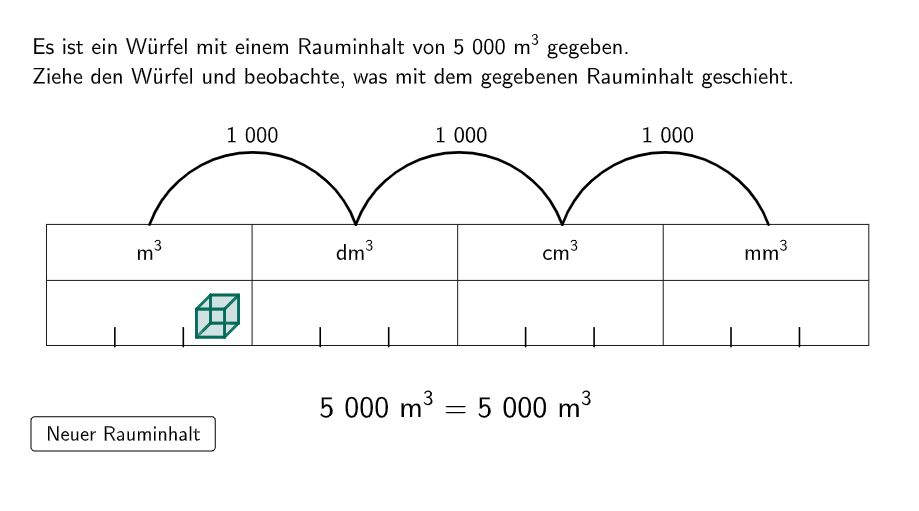
This example demonstrates the conversion relationships between different volume units (cubic meters, cubic decimeters, cubic centimeters, cubic millimeters). Key math concepts include volume unit conversion and decimal multiplication/division relationships. It uses GeoGebra commands like Random, If, Point, IndexOf, Sequence, Text, Polygon, TableText to create interactive questions and display answers. Suitable for 5th-6th grade students to learn and practice volume unit conversions.
GeoGebra Commands & Parameters
Random(1, Length[units]) → unitIndIf(questionCount ≟ 1, 5000, If[1 < questionCount ≤ 5, (RandomElement[1…10] * RandomElement[{100, 1000}]), If[questionCount > 5 ∧ unitInd ≟ 1, round(RandomUniform[0, 10], 2), questionCount > 5 ∧ unitInd ≟ 2, round(RandomUniform[0, 10], 1), questionCount > 5 ∧ unitInd ≟ 3, round(RandomUniform[10, 100], 2), questionCount > 5 ∧ unitInd ≟ 4, round(RandomUniform[100, 10000], 1)]]) → valPoint(listAnkerPunkte) → NIndexOf(N, listAnkerPunkte) → indexCurrentPosPoint(allowedPos) → ASequence(Semicircle[l1(i), l1(i + 1)], i, 1, Length[l1] - 1) → l2Sequence(Text[(("$\textsf{" * If[i ≟ 1, 1000, 10]) * "}$"), Midpoint[l1(i), l1(i + 1)] + (0, dy), true, true, 0], i, 1, Length[l1] - 1) → l3Sequence(Midpoint[l1(i), l1(i + 1)] - (0, 0.4), i, 1, Length[l1] - 1) → MsSequence(CircleArc[Ms(i), l1(i + 1), l1(i)], i, 1, Length[Ms]) → l4Text(ReplaceAll[(("\textsf{" * NumberSeparationComma[valNew]) * "}"), ".", ","], A + (0.44, 0.36), true, true, 0) → text4Polygon(B, C, 4) → Vieleck1, f, g, h, i, D, EPolygon(F, G, 4) → Vieleck2, j, k, l, m, H, IPolygon(E, I, H, D) → v1, e, i_1, h_1, dPolygon(C, G, H, D) → v2, c, g_1, h_2, d_1Polygon(B, C, G, F) → v3, b_1, c_1, g_2, f_1Polygon(B, F, I, E) → v4, b_2, f_2, i_2, e_1If(unitInd ≟ 1, round(RandomUniform[0, 10], 2), unitInd ≟ 2, round(RandomUniform[0, 10], 1), unitInd ≟ 3, round(RandomUniform[10, 100], 2), unitInd ≟ 4, round(RandomUniform[100, 10000], 1)) → wertTableText({"\vphantom{\frac{1}{2}}m^3", "dm^3", "cm^3", "mm^3"}, {"\vphantom{\large{\frac{1}{2}}}\hspace{6cm}", "\hspace{6cm}", "\hspace{6cm}", "\hspace{6cm}"}, "c_|h") → text1Sequence(((i * 1), 0), i, 0.73, 9, 0.73) → l5Sequence(If[Mod[i, 3] ≠ 0, Segment[Element[l5, i], Element[l5, i] + (0, 0.2)]], i, 1, 11) → linesText(text5, (4.4 - (x(Corner[text5, 2]) - x(Corner[text5, 1])) / 2, -0.4), true, true) → text6
AI Drawing Prompt Reference
Draw a 2D volume-unit conversion diagram made from two corresponding quadrilateral regions that together suggest a simple solid cross-section. First place one quadrilateral on the base plane, then construct a second quadrilateral adjacent to it so that matching sides connect to give a unified 3D-like outline. Use polygons to represent the two layers and their connecting faces, forming a clear combined figure. Add a table-style text area containing the unit headings m^3, dm^3, cm^3, and mm^3 with empty space beside them for answers. Finally, place a separate numeric text on the right side of the solid to display a conversion value.
The prompt above was compiled from the original drawing commands and is for reference only.