
Congruent Triangles
Loading the math board and drawing, please wait…
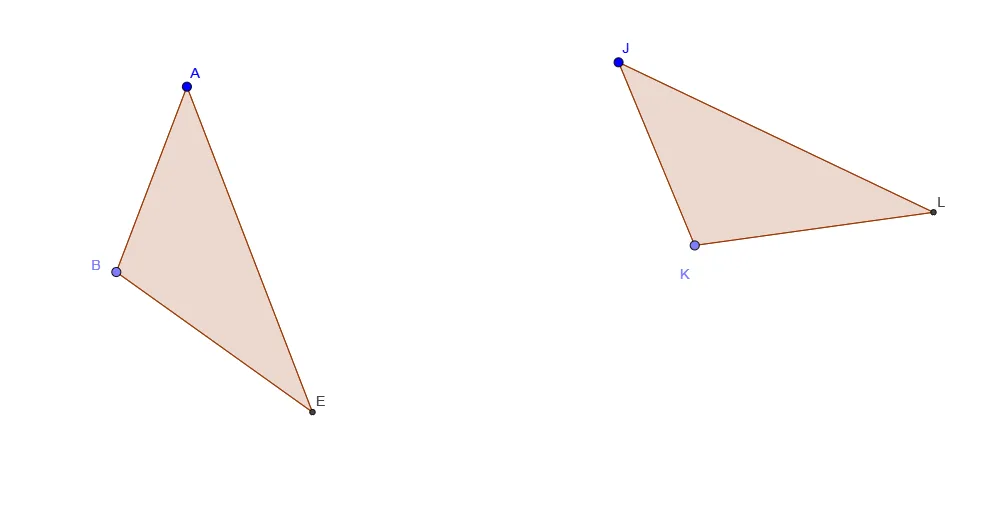
This example demonstrates the definition of congruent triangles. By constructing triangles and their corresponding sides and angles, students can visually understand the concept of congruent triangles. Commands used include Segment, Circle, Point, Intersect, Polygon, and Angle. Suitable for middle and high school students learning geometric construction.
GeoGebra Commands & Parameters
Segment(C, D) → fSegment(F, G) → gSegment(H, I) → hCircle(A, f) → cCircle(A, g) → kPoint(c) → BCircle(B, h) → pIntersect(k, p, 1) → EPolygon(B, A, E) → pol1, e_1, b, aCircle(J, f) → dPoint(d) → KCircle(J, g) → eCircle(K, h) → qIntersect(e, q, 1) → LPolygon(K, L, J) → pol2, j, k_2, lAngle(pol2) → δ, ε, ζAngle(E, B, A) → αAngle(A, E, B) → βAngle(B, A, E) → γPolygon(A, B, E) → pol3, e_2, a_1, b_1Polygon(J, K, L) → pol4, l_1, j_1, k_3
AI Drawing Prompt Reference
Draw two congruent triangles. Start with three segments of different lengths as reference sides. Using the first vertex as center, draw two circles with radii equal to the first and second segments. Pick a point on the first circle as the second vertex, then draw a circle centered at that point with radius equal to the third segment. Intersect this circle with the second circle to get the third vertex, and connect the three vertices to form the first triangle. Repeat the same construction starting from another vertex to create the second triangle, ensuring corresponding sides are equal. Finally, label all interior angles of both triangles and mark corresponding equal angles with matching symbols or colors to visually demonstrate congruence.
The prompt above was compiled from the original drawing commands and is for reference only.