
Congruent Triangles Exercise 3
Loading the math board and drawing, please wait…
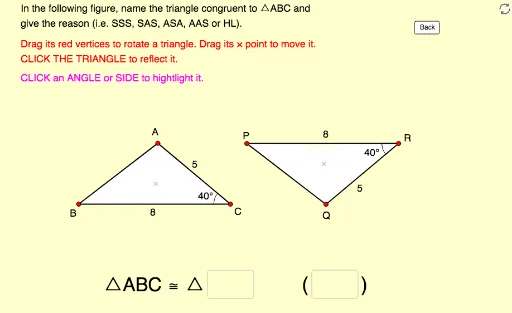
This example demonstrates naming congruent triangles and their reasons through moving, rotating, and reflecting triangles. It uses commands like Polygon, Vector, Angle, Intersect, Textfield, Segment, Midpoint, Rotate, Vertex. Suitable for junior high school geometry.
GeoGebra Commands & Parameters
Polygon(A, B, C) → poly1, c, a, bVector(P, A) → uVector(P, B) → vVector(P, C) → wPolygon(A_1, B_1, C_1) → poly1_1, c_1, a_1, b_1Vector(P_1, A_1) → u_1Vector(P_1, B_1) → v_1Vector(P_1, C_1) → w_1Angle(B, A, C) → αAngle(A, C, B) → βAngle(A_1, C_1, B_1) → γAngle(B_1, A_1, C_1) → δIntersect(Circle[Y_0, Side_a], Ray[Y_0, Rotate[X_0, 320°, Y_0]]) → Z_0,Polygon(X_0, Y_0, Z_0) → poly2, z_0, x_0, y_0Textfield(text13) → Ans1Textfield(text14) → Ans2Segment(D, E) → rMidpoint(Segment[Intersect[Circle[A, r], b], Intersect[Circle[A, r], c]]) → FMidpoint(Segment[Intersect[Circle[C, r], a], Intersect[Circle[C, r], b]]) → GMidpoint(Segment[Intersect[Circle[A_1, r], b_1], Intersect[Circle[A_1, r], c_1]]) → HMidpoint(Segment[Intersect[Circle[C_1, r], a_1], Intersect[Circle[C_1, r], b_1]]) → IAngle(A_1, B_1, C_1) → εAngle(C, B, A) → ζMidpoint(Segment[Intersect[Circle[B, r], a], Intersect[Circle[B, r], c]]) → JMidpoint(Segment[Intersect[Circle[B_1, r], a_1], Intersect[Circle[B_1, r], c_1]]) → KRotate(Translate[Polygon[Mirror[X_0, x = 0], Mirror[Y_0, x = 0], Mirror[Z_0, x = 0]], (20, 0)], 180°, (14.430456165798875, 1.6001835062956644)) → poly3Vertex(poly3, 1) → X_1Vertex(poly3, 2) → Y_1Vertex(poly3, 3) → Z_1