
Cone Stand: Geometric Construction and Stochastic Simulation
Loading the math board and drawing, please wait…
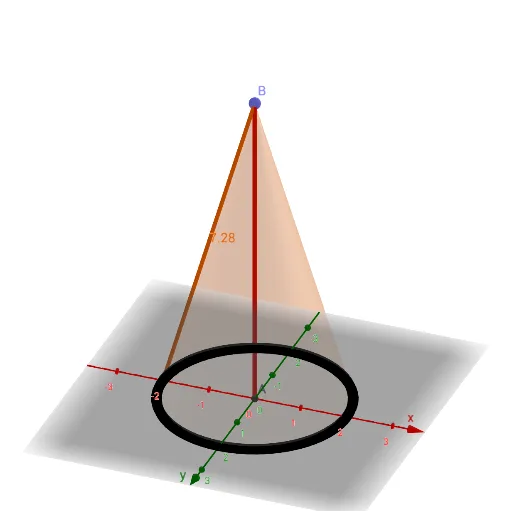
① This example demonstrates a 3D geometric figure named 'Cone Stand', likely a cone or conical frustum support structure, visualized in GeoGebra's 3D view. ② Core mathematical concepts include cones, isosceles triangles, parabolas, and matrix operations, along with stochastic process simulation for generating random points or dynamic variations. ③ Construction details: Based on the summary, the GeoGebra commands used are Intersect, Point, Cone, and Segment, involving objects A, B, a, c, b, f, C, and g. These objects likely represent points, segments, cones, or auxiliary curves, and are combined via intersections and connections to form the cone stand's framework. ④ Suitable for high school to university levels, this example is useful for teaching solid geometry, analytic geometry, matrix transformations, and stochastic process visualization, helping students understand the integration of spatial figures and algebraic operations.
GeoGebra Commands & Parameters
Intersect(yAxis, xAxis) → APoint(zAxis) → BCone(A, B, 2) → a, c, bSegment(A, B) → fIntersect(xAxis, c, 2) → CSegment(C, B) → g
AI Drawing Prompt Reference
Draw a 3D cone stand structure. Start by marking the intersection of the horizontal axes as the base center, then choose a point on the vertical axis as the apex. Construct a cone with the base center and apex, using a given radius. Draw a vertical segment connecting the base center to the apex. Then let the horizontal axis intersect the cone's lateral surface to obtain a point on the side, and finally connect that point to the apex with a slanted segment. The result is a solid geometric framework of a cone, axis, side point, and slanted edge, optionally with random points for stochastic simulation.
The prompt above was compiled from the original drawing commands and is for reference only.