
Cone, Sphere, Cylinder
Loading the math board and drawing, please wait…
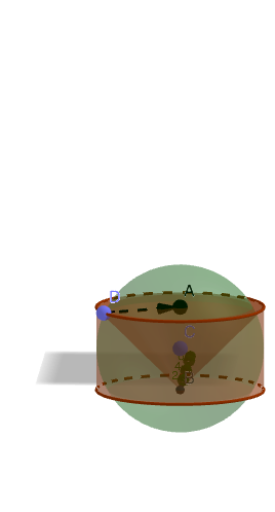
This example demonstrates the construction of a cone, sphere, and cylinder. Key mathematical concepts include the basic properties of these solid shapes in solid geometry. Using GeoGebra commands such as Point, Intersect, Cylinder, Cone, Sphere, and Vector, the generation process of these solid figures can be visually understood. Suitable for middle school and above students or teachers for teaching and learning.
GeoGebra Commands & Parameters
Point(zAxis) → AIntersect(zAxis, xAxis) → BCylinder(A, B, 3) → a, c, d, bCone(A, B, 3) → e, f, gPoint(zAxis) → CSphere(C, 3) → hPoint(f) → DVector(D, A) → u
AI Drawing Prompt Reference
Draw a cone, cylinder, and sphere in a 3D coordinate system. Start by placing a point A on the z-axis and another point B on the x-axis, then create a cylinder and a cone with A and B as the bases and a height of 3. Next, place a point C on the z-axis and draw a sphere with C as the center and a radius of 3. Finally, draw a line segment from the cone's apex in the direction of a vector.
The prompt above was compiled from the original drawing commands and is for reference only.