
Cone's Cross Section
Loading the math board and drawing, please wait…
In collections
Cross Sections
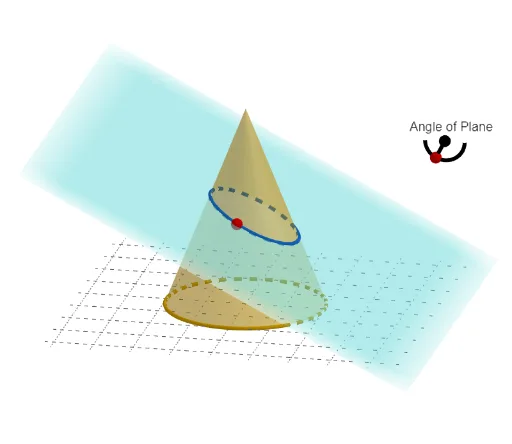
This example demonstrates the cross section of a cone. Key mathematical concepts include solid geometry and coordinate geometry. Using GeoGebra commands such as Intersect, Point, and Cone, the cross section of a cone can be constructed. Suitable for high school students or educators.
GeoGebra Commands & Parameters
Intersect(yAxis, xAxis) → APoint(zAxis) → FIntersect(zAxis, xAxis) → ECone(E, F, 1) → TheCone, r, iPointIn(i) → GPoint(xAxis) → IPoint(xAxis) → KPoint(zAxis) → OPlane(I, K, O) → pPointIn(p) → CenterOfNormalAngleLine(CenterOfNormalAngle, xAxis) → gCircle(CenterOfNormalAngle, 0.25, p) → cIntersect(g, c) → i_{2}, i_1CircleArc(CenterOfNormalAngle, i_{2}, i_1, p) → ArcForPlaneAnglePoint(ArcForPlaneAngle) → NormalAngleHandleSegment(CenterOfNormalAngle, NormalAngleHandle) → NormalSegPoint(zAxis) → BCircle(CenterOfNormalAngle, 0.25, p) → dPoint(yAxis) → JPlane(I, J, K) → qOrthogonalLine(CenterOfNormalAngle, g, p) → hPoint(zAxis) → CCylinder(A, C, 1) → TheCylinder, e, f, bOrthogonalPlane(G, NormalSeg) → PerPenPlaneIntersectPath(PerPenPlane, TheCone) → k
AI Drawing Prompt Reference
Draw the cross-section of a cone, showing its intersection points with coordinate axes and the relationship between the cross-section. First, plot the coordinate axes and mark key intersection points, then construct the cone and determine its cross-sectional circle. Next, establish the normal angle using the cross-sectional circle and axes, and draw the normal segment and arc. Finally, add a cylinder intersecting the cone and draw the intersection path, fully demonstrating the geometric relationship between the cross-section and the cone.
The prompt above was compiled from the original drawing commands and is for reference only.