
Cone and Plane Intersection Animation
Loading the math board and drawing, please wait…
In collections
intersection: surface-surface, curve-curve
intersection: surface-surface, curve-curve
intersection: surface-surface, curve-curve
intersection: surface-surface, curve-curve
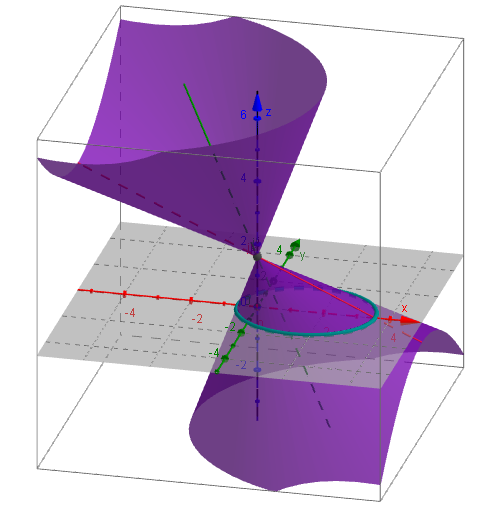
This example demonstrates the intersection of a cone and a plane through an animation, showcasing conic sections in plane curves. Key mathematical concepts include coordinate geometry and solid geometry. Using GeoGebra commands such as Segment, CircleArc, Plane, and IntersectPath, a dynamic demonstration of conic sections is constructed. Suitable for high school mathematics education and learning.
GeoGebra Commands & Parameters
Segment(A, B) → aSegment(C, D) → bSegment(D, E) → cCircleArc(D, E, C) → dSemicircle(A, B) → ePoint(e) → GPoint(d) → HSegment(F, G) → fSegment(D, H) → gAngle(G, F, A) → αAngle(H, D, C) → βPlane(I, J, K) → hOrthogonalLine(I, h) → iPoint(zAxis) → LLine(I, L) → jRotate(j, α, i) → j'ConeInfinite(I, j', β) → kIntersectPath(xOyPlane, k) → pRotate(j', β, i) → j''
AI Drawing Prompt Reference
Draw an animation of a cone and plane intersection. First, draw two diameter segments a and b for the base circle, then draw arc d and semicircle e. Determine the cone's vertex I and base center J, K. Next, draw a vertical line i from I, rotate line j to get j', then rotate cone k around j' to get cone k. Finally, rotate j' to get j'', and rotate cone k on the xOy plane to get the intersection line p.
The prompt above was compiled from the original drawing commands and is for reference only.