
Complex Square Root
Loading the math board and drawing, please wait…
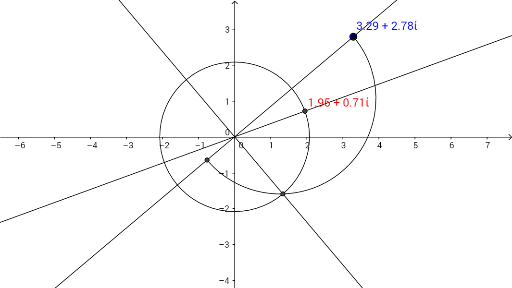
This example illustrates the concept of complex square roots. It involves basic operations and geometric representation of complex numbers. Using GeoGebra commands such as Point, AngularBisector, Line, Circle, etc., the construction of complex square roots is demonstrated. Suitable for high school mathematics education and learning about complex numbers.
GeoGebra Commands & Parameters
Point(yAxis) → APoint(xAxis) → BAngularBisector(z_1, A, B) → fLine(z_1, A) → gCircle(A, 1) → cIntersect(c, g, 2) → CSemicircle(z_1, C) → dOrthogonalLine(A, g) → hIntersect(d, h, 1) → DCircle(A, D) → eIntersect(e, f, 2) → E
AI Drawing Prompt Reference
Draw the geometric representation of a complex square root. Start by taking point A on the y-axis and point B on the x-axis. Then, construct the angle bisector f through A, B, and the complex number z1. Next, draw a line g through A and z1, and construct a circle c with center A and radius 1. The intersection of circle c and line g is point C, which is the starting point of semicircle d. Draw a perpendicular line h from A, and find the intersection D of semicircle d and line h, which serves as the center of circle e. The intersection E of circle e and angle bisector f is the complex square root we are looking for.
The prompt above was compiled from the original drawing commands and is for reference only.