
Complex Root Lab: Dynamic Exploration of Complex Roots on the Plane
Loading the math board and drawing, please wait…
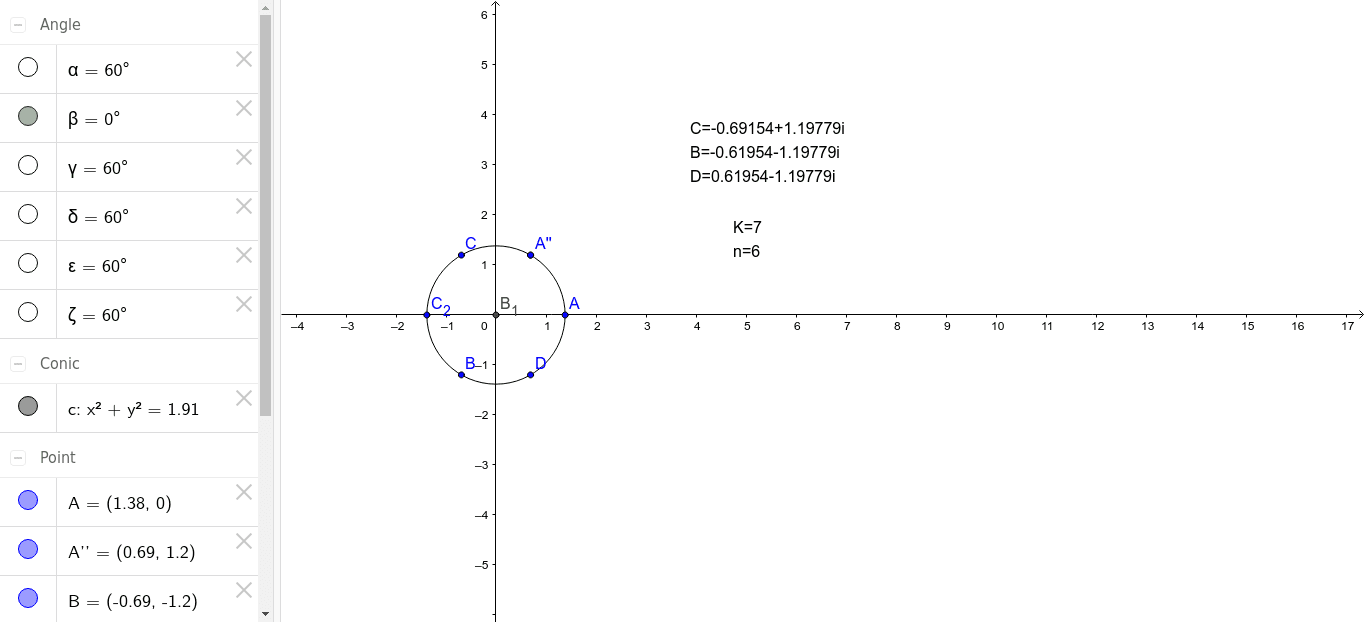
This GeoGebra example demonstrates the geometric interpretation of complex roots in the complex plane, linking complex arithmetic with conic sections and trigonometric functions. Core mathematical concepts include complex roots, the complex plane, rotation and angle measurement, conic sections (such as parabolas), and geometric representations of conditional probability. Construction highlights: the Intersect command finds intersection points, Circle constructs circles, Rotate applies rotation corresponding to complex multiplication, and Angle measures angles; objects include multiple points (A, B, C, D, etc.), circle c, angles α, β, γ, δ, ε, ζ, and text labels. Suitable for high school to university students and teachers exploring complex numbers, analytic geometry, and trigonometry, this lab offers an interactive way to investigate the distribution of complex roots and their connections to geometric shapes.
GeoGebra Commands & Parameters
Intersect(xAxis, yAxis) → B_1Circle(B_1, A) → cRotate(A, 60*°, B_1) → B_2Angle(A, B_1, B_2) → αRotate(B_2, 3600*°, B_1) → A''Angle(B_2, B_1, A'') → βRotate(B_2, 60*°, B_1) → CAngle(B_2, B_1, C) → γRotate(C, 60*°, B_1) → C_2Angle(C, B_1, C_2) → δRotate(C_2, 60*°, B_1) → BAngle(C_2, B_1, B) → εRotate(B, 60*°, B_1) → DAngle(B, B_1, D) → ζ
AI Drawing Prompt Reference
Draw a circle centered at the origin in the complex plane, marking its intersection with the real axis. From this intersection, draw a line segment to a point on the circle. Rotate this line segment 60 degrees counterclockwise around the intersection point to create a new line segment and angle. Repeat this rotation three more times, each by 60 degrees, to get four points and a circle. Measure and label the angles between the original line and each rotated line.
The prompt above was compiled from the original drawing commands and is for reference only.