
Complex Number Multiplication Exploration
Loading the math board and drawing, please wait…
In collections
Complex number multiplication
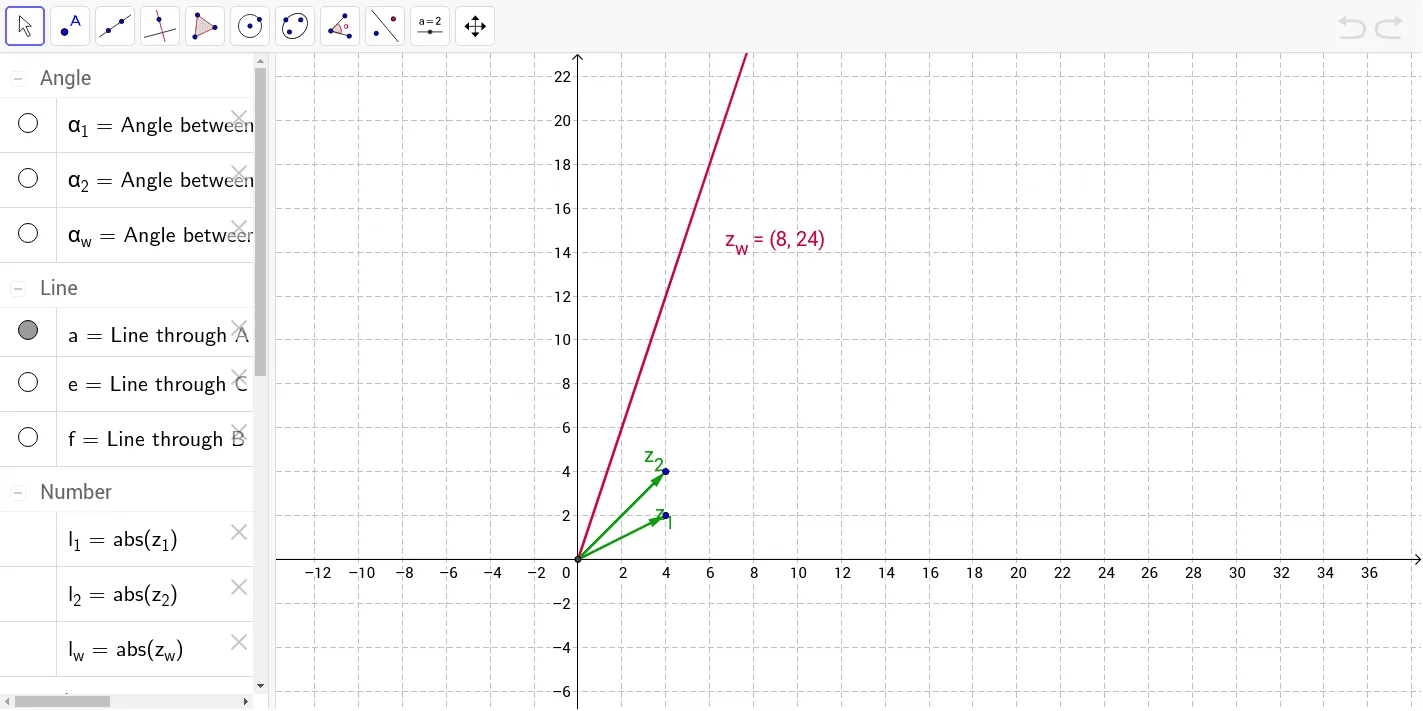
This example demonstrates the geometric interpretation of complex number multiplication, showing the changes in argument and modulus. Key mathematical concepts include the argument and modulus of complex numbers. It uses commands like Intersect, Vector, Line, Ray, Angle, and Point in GeoGebra. Suitable for high school math education and students learning complex number multiplication.
GeoGebra Commands & Parameters
Intersect(xAxis, yAxis) → AVector(A, B) → z_1Line(A, xAxis) → aVector(A, C) → z_2Ray(A, C) → bRay(A, B) → cAngle(a, c) → α_1Angle(a, b) → α_2Point(z_w) → DRay(A, D) → dAngle(a, d) → α_wLine(C, z_1) → eLine(B, z_2) → f
AI Drawing Prompt Reference
Draw the geometric interpretation of complex number multiplication. Start by drawing the intersection point A of the x-axis and y-axis, then draw the vector z_1 from A to B. Draw a line a through A parallel to the x-axis, then draw the vector z_2 from A to C, and the ray b from A through C. Calculate the angle α_1 between a and c, and the angle α_2 between a and b. Draw the ray d from z_1 through a point D, and calculate the angle α_w between a and d. Finally, draw the line e through C parallel to z_1 and the line f through B parallel to z_2.
The prompt above was compiled from the original drawing commands and is for reference only.