
Completing the Square by Jill Vincent
Loading the math board and drawing, please wait…
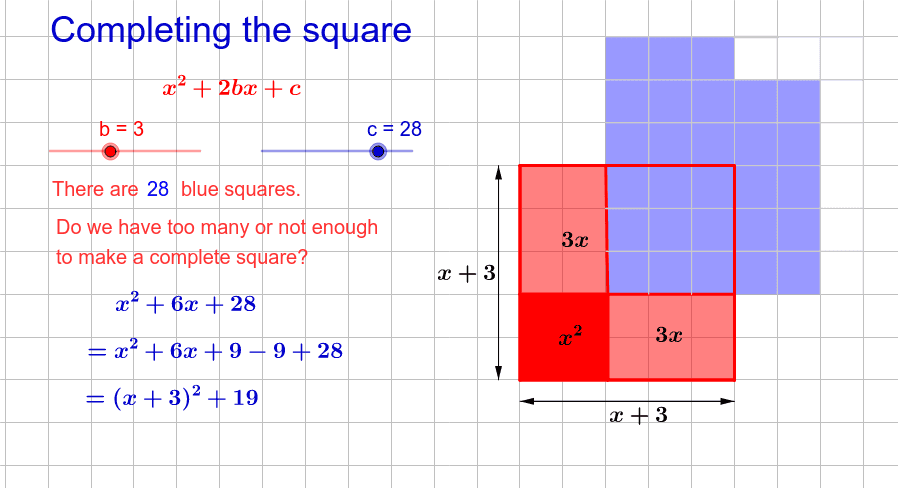
This example demonstrates the process of completing the square with simple quadratic expressions. Key mathematical concepts include quadratic expressions. The construction uses Polygon, Intersect, Vector, Midpoint, and other GeoGebra commands. Suitable for middle school and above students to learn the method of completing the square.
GeoGebra Commands & Parameters
Polygon(B, D, C, A) → poly1, b_1, d, c_2, aPolygon(D, F, E, C) → poly2, d_1, f, e, c_1Polygon(G, I, D, B) → poly3, g, i, d_2, b_2Polygon(J, T, A_1, D) → poly4, j, t, a_1, d_3Polygon(B_1, Q, T, J) → poly5, b_3, q, t_1, j_1Polygon(K, P, Q, B_1) → poly6, k, p, q_1, b_4Polygon(Z_1, W_1, M, L) → poly8, z_1, w_1, m_1, l_1Polygon(A_2, B_2, W_1, Z_1) → poly9, a_2, b_5, w_2, z_2Polygon(Q, R, S, T) → poly10, q_2, r, s, t_2Polygon(T, S, J_2, A_1) → poly11, t_3, s_1, j_2, a_3Polygon(P, O, R, Q) → poly12, p_2, o, r_1, q_3Polygon(S, U, K_2, J_2) → poly13, s_2, u, k_2, j_3Polygon(R, V, U, S) → poly14, r_2, v, u_1, s_3Polygon(O, W, V, R) → poly15, o_1, w, v_1, r_3Polygon(L, M, P, K) → poly16, l_2, m_2, p_3, k_3Polygon(M, N, O, P) → poly17, m_3, n, o_2, p_4Polygon(N, Z, W, O) → poly18, n_1, z, w_3, o_3Polygon(Z, K_1, J_1, W) → poly19, z_3, k_4, j_4, w_4Polygon(W, J_1, I_1, V) → poly20, w_5, j_5, i_1, v_2Polygon(V, I_1, H_1, U) → poly21, v_3, i_2, h_1, u_2Polygon(U, H_1, C_1, K_2) → poly22, u_3, h_2, c_3, k_5Polygon(W_1, V_1, N, M) → poly7, w_6, v_4, n_2, mPolygon(V_1, U_1, Z, N) → poly23, v_5, u_4, z_4, n_3Polygon(U_1, T_1, K_1, Z) → poly24, u_5, t_4, k_1, z_5Polygon(H_1, G_1, D_1, C_1) → poly25, h_3, g_1, d_4, c_4Polygon(I_1, N_1, G_1, H_1) → poly26, i_3, n_4, g_2, h_4Polygon(J_1, M_1, N_1, I_1) → poly27, j_6, m_4, n_5, i_4Polygon(K_1, L_1, M_1, J_1) → poly28, k_6, l_3, m_5, j_7Polygon(T_1, S_1, L_1, K_1) → poly29, t_5, s_4, l_4, k_7Polygon(B_2, C_2, V_1, W_1) → poly30, b_6, c_5, v_6, w_7Polygon(C_2, D_2, U_1, V_1) → poly31, c_6, d_5, u_6, v_7Polygon(D_2, E_2, T_1, U_1) → poly32, d_6, e_2, t_6, u_7Polygon(E_2, F_2, S_1, T_1) → poly33, e_1, f_2, s_5, t_7Polygon(G_1, F_1, E_1, D_1) → poly34, g_3, f_1, e_3, d_7Polygon(N_1, O_1, F_1, G_1) → poly35, n_6, o_4, f_3, g_4Polygon(M_1, P_1, O_1, N_1) → poly36, m_6, p_1, o_5, n_7Polygon(L_1, Q_1, P_1, M_1) → poly37, l_5, q_4, p_5, m_7Polygon(S_1, R_1, Q_1, L_1) → poly38, s_6, r_4, q_5, l_6Polygon(F_2, G_2, R_1, S_1) → poly39, f_4, g_5, r_5, s_7Intersect(a, c_2) → HIntersect(b_2, g) → H_2Intersect(g_5, f_4) → L_2Intersect(e, f) → M_2Polygon(H, O_2, P_2, N_2) → poly40, h, o_6, p_6, n_8Vector(U_2, V_2) → lVector(V_2, U_2) → a_4Midpoint(U_2, V_2) → W_2Vector(A_3, Z_2) → e_4Vector(Z_2, A_3) → a_5Midpoint(A_3, Z_2) → B_3
AI Drawing Prompt Reference
Draw a complex geometric structure consisting of multiple quadrilaterals and vectors. Start by drawing a quadrilateral with vertices at H, O2, P2, and N2. Then add other quadrilaterals and vectors, ensuring that each quadrilateral's vertices are correctly connected to the vectors, forming a intricate geometric shape.
The prompt above was compiled from the original drawing commands and is for reference only.