
Complementary Angles Investigation
Loading the math board and drawing, please wait…
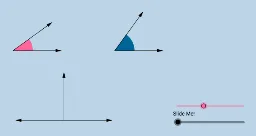
This example dynamically illustrates what it means for two angles to be complementary without measuring angles, engaging students visually. It covers core concepts of complementary angles and geometric representation. Constructed using commands like Circle, Segment, Point, Ray, Midpoint, OrthogonalLine, Intersect, Rotate, Vector, suitable for middle school and above to explore angle relationships and geometric constructions.
GeoGebra Commands & Parameters
Circle(A, B) → cSegment(A, B) → aPoint(b) → CRay(A, C) → dPoint(d) → DCircle(D, a) → eMidpoint(A, D) → EOrthogonalLine(E, b) → fPoint(f) → FRay(E, F) → gPoint(g) → GIntersect(c, b) → H, IIntersect(e, b) → J, KRotate(I, α, A) → I'Angle(I, A, I') → βRotate(K, π / 2 - β, D) → K'Angle(K, D, K') → γCircle(A, (0.4 * a)) → hCircle(D, (0.4 * a)) → kSegment(A, I') → iSegment(D, K') → jIntersect(h, b, 2) → LIntersect(h, i, 1) → MIntersect(k, b, 2) → NIntersect(k, j, 1) → OCircle(G, a) → pIntersect(p, l, 2) → PIntersect(p, l, 1) → QIntersect(p, g, 1) → RVector(G, P) → uVector(G, R) → vCircleSector(A, L, M) → qCircleSector(D, N, O) → rDilate(A, If[0 < m ≤ 1, 1 - m, 0], G) → A'Vector(A, A') → wTranslate(q, w) → q'Rotate(q', If[1 < m ≤ 2, ((m - 1) * (π / 2 - α)), π / 2 - α], G) → q''Dilate(D, If[2 < m ≤ 3, 3 - m, 0], G) → D'Vector(D, D') → nTranslate(r, n) → r'Vector(G, Q) → sAngle(R, G, Q) → δVector(A, I') → u_1Vector(A, I) → tVector(D, K) → v_1Vector(D, K') → w_1
AI Drawing Prompt Reference
Draw two complementary angles using a circle and a ray. First, draw a circle and a ray, then find their intersection points. Use one intersection point as the center to draw another circle. Connect the intersection points of the new circle with the ray to form the complementary angles. Decorate the diagram with sectors and vectors to illustrate the dynamic relationship between the angles.
The prompt above was compiled from the original drawing commands and is for reference only.